
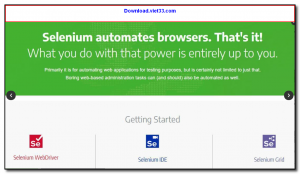
Selenium is the world’s most widely used open-source framework for automating web browsers. It enables developers and QA engineers to write automated tests that control browsers programmatically — clicking buttons, filling forms, navigating pages, and verifying content — across Chrome, Firefox, Edge, Safari, and other browsers.
Selenium consists of several components: Selenium WebDriver for writing tests in Python, Java, C#, JavaScript, Ruby, or Kotlin; Selenium IDE for recording and playing back browser interactions without coding; and Selenium Grid for running tests in parallel across multiple browsers and machines simultaneously.
Whether you are building automated regression test suites, scraping dynamic JavaScript-rendered web pages, or running cross-browser compatibility checks, Selenium is the industry-standard tool trusted by thousands of companies worldwide.
Key Features
- WebDriver API for controlling Chrome, Firefox, Edge, Safari, and other browsers programmatically
- Supports Python, Java, C#, JavaScript, Ruby, and Kotlin for writing test scripts
- Selenium IDE browser extension for no-code record and playback test creation
- Selenium Grid for running tests in parallel across multiple browsers and OS environments
- Cross-platform — runs on Windows, macOS, and Linux
- Integrates with testing frameworks like pytest, JUnit, TestNG, and NUnit
- Active community with extensive documentation, tutorials, and third-party integrations
How to Install
- Click the download button below or install via pip for Python:
pip install selenium - For Java, add the Selenium dependency to your Maven or Gradle build file.
- Download the appropriate WebDriver for your browser (e.g., ChromeDriver for Chrome) and place it on your PATH.
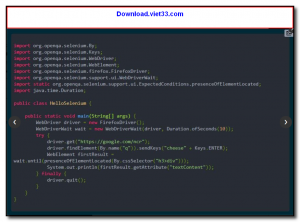
- Write your first test: create a
WebDriverinstance, navigate to a URL, and interact with elements. - Run your test script and watch Selenium automate the browser in real time.
Frequently Asked Questions about Selenium – Open-Source Web Browser Automation and Testing Framework
Is Selenium – Open-Source Web Browser Automation and Testing Framework free?
Selenium – Open-Source Web Browser Automation and Testing Framework is completely free to download and use — no registration or payment required.
What are the system requirements for Selenium – Open-Source Web Browser Automation and Testing Framework?
Minimum requirements: Windows 7/10/11. A modern PC with at least 2GB RAM is recommended.
What is the latest version of Selenium – Open-Source Web Browser Automation and Testing Framework?
The latest version is 4.36.0, updated on 12/10/2025.
Is Selenium – Open-Source Web Browser Automation and Testing Framework safe to download?
Yes. All software listed on download.viet33.com is sourced directly from the official developer and verified before publishing. No bundled adware or malware.
Does Selenium – Open-Source Web Browser Automation and Testing Framework work on Windows 11?
Yes, Selenium – Open-Source Web Browser Automation and Testing Framework is compatible with Windows 7/10/11, including Windows 11.
 Download Foxit PDF Reader 2026.1.2
47 Downloads
Download Foxit PDF Reader 2026.1.2
47 Downloads
 Download Bluesofts AccHelper 3.1.0
46 Downloads
Download Bluesofts AccHelper 3.1.0
46 Downloads
 Download Microsoft Office 365 Professional Plus
46 Downloads
Download Microsoft Office 365 Professional Plus
46 Downloads
 Download Microsoft Excel 2016
51 Downloads
Download Microsoft Excel 2016
51 Downloads
 Download Adobe Reader XI 11.0.23
51 Downloads
Download Adobe Reader XI 11.0.23
51 Downloads


