
Quick Macros is a powerful macro automation software for Windows that lets you record, create, and run macros to automate repetitive mouse clicks, keyboard input, and complex workflows. From simple hotkey shortcuts to advanced scripted automation, Quick Macros handles it all with precision and speed.
Unlike basic macro recorders, Quick Macros features its own scripting language with hundreds of functions, enabling you to create sophisticated automation scripts that interact with windows, files, the internet, and system settings. It is ideal for data entry automation, game automation, testing, and productivity enhancement.
With support for triggers like hotkeys, scheduled times, and window events, Quick Macros can run your automations exactly when you need them — silently in the background or interactively with on-screen feedback.
Key Features
- Record and replay mouse clicks and keyboard input with one click
- Powerful built-in scripting language with hundreds of automation functions
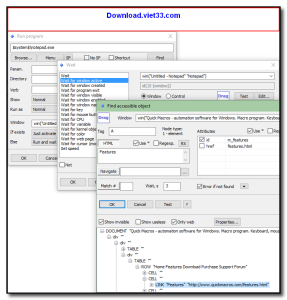
- Trigger macros via hotkeys, scheduled time, window events, or mouse gestures
- Automate web browsing, file operations, and application control
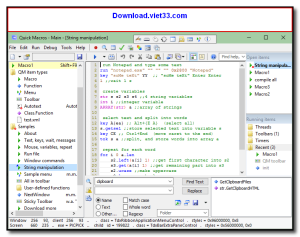
- Edit macros with a full-featured script editor with syntax highlighting
- Run multiple macros simultaneously or in sequence
- Portable option available — run from USB without installation
How to Install
- Click the download button above to get the Quick Macros installer.
- Run the setup file and follow the on-screen instructions to install.
- Launch Quick Macros and click “New Macro” to create your first automation.
- Use the recorder to capture mouse and keyboard actions, or write a script manually.
- Assign a hotkey trigger and run your macro to automate the task instantly.
Frequently Asked Questions about Quick Macros
Is Quick Macros free?
Quick Macros offers a free trial period. Full features may require a paid license.
What are the system requirements for Quick Macros?
Minimum requirements: Windows7,8,10,11. A modern PC with at least 2GB RAM is recommended.
What is the latest version of Quick Macros?
The latest version is 2.4.11, updated on 27/12/2025.
Is Quick Macros safe to download?
Yes. All software listed on download.viet33.com is sourced directly from the official developer and verified before publishing. No bundled adware or malware.
Does Quick Macros work on Windows 11?
Yes, Quick Macros is compatible with Windows7,8,10,11, including Windows 11.
 Download DesktopCalendar 2.3.108.5601
87 Downloads
Download DesktopCalendar 2.3.108.5601
87 Downloads
 Download Hard Disk Sentinel 6.40
73 Downloads
Download Hard Disk Sentinel 6.40
73 Downloads
 Download Windows 10
57 Downloads
Download Windows 10
57 Downloads
 Download HWMonitor 1.66
95 Downloads
Download HWMonitor 1.66
95 Downloads
 Download KeyTweak 2.3.0
64 Downloads
Download KeyTweak 2.3.0
64 Downloads


