
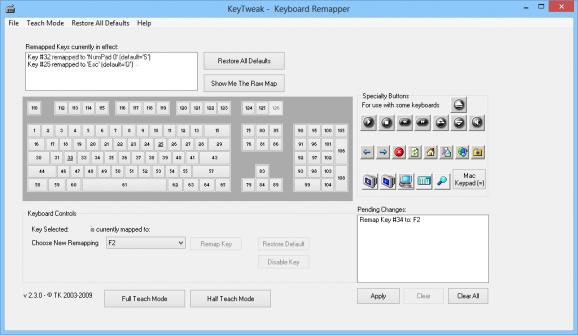
Some keyboards ship with keys in awkward spots, or you’d simply rather have a different key trigger a certain function, and that’s the itch that leads people to download KeyTweak. Created by Travis Krumsick, this small utility reads your keyboard’s scan codes and lets you remap almost any key to act as another, all through a clear grid-style interface that mirrors a real keyboard layout.
There’s no complicated scripting involved. You pick a key, choose what it should behave as instead, and KeyTweak writes the change directly into the Windows registry so it takes effect after a restart.
Key Features of KeyTweak
- Visual, full-keyboard layout for picking exactly which key to remap
- Remap standard keys, multimedia keys, and special manufacturer buttons
- “Teach Mode” detects a key press automatically instead of hunting for it on the grid
- Restore All Defaults option to instantly undo every custom mapping
- Works directly with the Windows registry, no background process required
- Simple, lightweight interface with no unnecessary extras
Screenshot / Demo
How to Install KeyTweak
- Click the download button to get the KeyTweak installer.
- Run the downloaded file and follow the setup wizard.
- Accept the license agreement and choose an install location.
- Complete the installation and launch KeyTweak, then restart when prompted.
- Enjoy using KeyTweak!
 Download HWMonitor 1.66
11 Downloads
Download HWMonitor 1.66
11 Downloads
 Download Hiren’s BootCD PE 1.0.8
9 Downloads
Download Hiren’s BootCD PE 1.0.8
9 Downloads
 Download Revo Uninstaller Portable 2.7.0
26 Downloads
Download Revo Uninstaller Portable 2.7.0
26 Downloads
 Download FurMark 2.10.2
28 Downloads
Download FurMark 2.10.2
28 Downloads
 Download CrystalDiskInfo 9.9.2
27 Downloads
Download CrystalDiskInfo 9.9.2
27 Downloads

