
nmon (Nigel’s Monitor) is a free, lightweight system performance monitoring tool for Linux that displays real-time statistics for CPU, memory, disk I/O, network, processes, and filesystem usage in a terminal interface. Originally developed by IBM and now open source, nmon is widely used by Linux system administrators for both interactive monitoring and data collection for performance analysis.
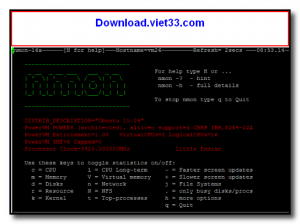
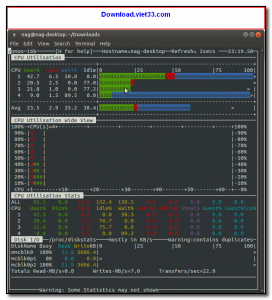
In interactive mode, nmon displays a customizable dashboard in the terminal where administrators can toggle different views using single-key shortcuts — showing CPU graphs, memory usage, top processes, network statistics, disk activity, and more simultaneously on a single screen. This makes it ideal for quick system health checks without a graphical desktop.
In recording mode, nmon captures performance data to a CSV file at regular intervals, which can then be processed by the nmon Analyser spreadsheet (an Excel/LibreOffice template) to generate detailed performance charts and reports. This makes nmon invaluable for capacity planning, performance baselining, and troubleshooting Linux servers.
Key Features
- Interactive terminal dashboard with real-time CPU, memory, disk, network, and process stats.
- Single-key toggle views for customizing which metrics are displayed simultaneously.
- Data recording mode that captures metrics to CSV files for offline analysis.
- Compatible with nmon Analyser for generating performance charts in Excel/LibreOffice.
- Very lightweight, with minimal impact on the system being monitored.
- Supports AIX and Linux (x86, x86_64, ARM, Power) architectures.
- Free and open source under the GNU GPL license.
How to Install
- Install nmon via your Linux package manager: sudo apt install nmon (Debian/Ubuntu) or sudo yum install nmon (RHEL/CentOS).
- Alternatively, download the precompiled binary from the link below and make it executable: chmod +x nmon
- Run nmon in your terminal to start the interactive dashboard.
- Press shortcut keys to toggle views: c (CPU), m (memory), d (disk), n (network), t (top processes).
- For data recording: nmon -f -s 30 -c 120 captures 120 snapshots every 30 seconds to a CSV file.
Frequently Asked Questions about nmon – Free Linux System Performance Monitor
Is nmon – Free Linux System Performance Monitor free?
nmon – Free Linux System Performance Monitor is completely free to download and use — no registration or payment required.
What are the system requirements for nmon – Free Linux System Performance Monitor?
Minimum requirements: Linux. A modern PC with at least 2GB RAM is recommended.
What is the latest version of nmon – Free Linux System Performance Monitor?
Check the version info box at the top of this page for the current release.
Is nmon – Free Linux System Performance Monitor safe to download?
Yes. All software listed on download.viet33.com is sourced directly from the official developer and verified before publishing. No bundled adware or malware.
Does nmon – Free Linux System Performance Monitor work on Windows 11?
Yes, nmon – Free Linux System Performance Monitor is compatible with Linux, including Windows 11.
 Download DesktopCalendar 2.3.108.5601
87 Downloads
Download DesktopCalendar 2.3.108.5601
87 Downloads
 Download Hard Disk Sentinel 6.40
73 Downloads
Download Hard Disk Sentinel 6.40
73 Downloads
 Download Windows 10
57 Downloads
Download Windows 10
57 Downloads
 Download HWMonitor 1.66
95 Downloads
Download HWMonitor 1.66
95 Downloads
 Download KeyTweak 2.3.0
64 Downloads
Download KeyTweak 2.3.0
64 Downloads


