
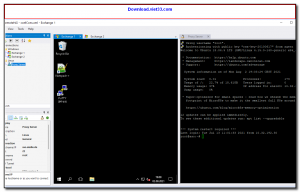
mRemoteNG is a free, open-source multi-protocol remote connections manager for Windows. It allows system administrators and IT professionals to manage all their remote connections — including RDP, VNC, SSH, Telnet, HTTP/HTTPS, rlogin, and more — from a single, tabbed interface, eliminating the need to juggle multiple remote desktop and terminal tools.
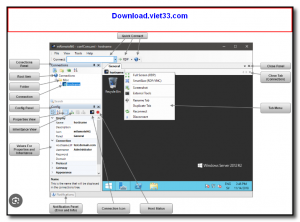
Built as a fork of the original mRemote project, mRemoteNG offers an organized connection tree where you can group servers and workstations into folders, store connection credentials securely, and quickly connect to any machine with a single click. All connection settings are saved in an encrypted XML file, making it easy to back up and transfer your connection library between computers.
mRemoteNG is particularly valued in enterprise environments where administrators manage dozens or hundreds of servers across different protocols. Its tabbed session management, inheritance of connection properties, and support for importing from PuTTY and Active Directory make it a comprehensive remote management hub.
Key Features
- Supports RDP, VNC, SSH, Telnet, HTTP/HTTPS, rlogin, Raw, and ICA protocols in a single app.
- Tabbed interface for managing multiple simultaneous remote sessions side by side.
- Organized connection tree with folders, groups, and inherited connection properties.
- Encrypted credential storage to securely save usernames and passwords.
- Import connections from PuTTY sessions and Active Directory.
- Connection export and backup via encrypted XML configuration file.
- Free and open source under the GNU GPL license.
How to Install
- Download the mRemoteNG installer or portable ZIP from the link below.
- Run the installer and follow the setup wizard, or extract the portable version to any folder.
- Launch mRemoteNG and create a new connection by right-clicking in the Connections panel.
- Enter the server hostname or IP, select the protocol (RDP, SSH, VNC, etc.), and set credentials.
- Double-click the connection to open it in a new tab within the mRemoteNG window.
Frequently Asked Questions about mRemoteNG – Free Multi-Protocol Remote Connection Manager
Is mRemoteNG – Free Multi-Protocol Remote Connection Manager free?
mRemoteNG – Free Multi-Protocol Remote Connection Manager is completely free to download and use — no registration or payment required.
What are the system requirements for mRemoteNG – Free Multi-Protocol Remote Connection Manager?
Minimum requirements: Windows7,8,10,11. A modern PC with at least 2GB RAM is recommended.
What is the latest version of mRemoteNG – Free Multi-Protocol Remote Connection Manager?
The latest version is 1.76.20, updated on 17/09/2025.
Is mRemoteNG – Free Multi-Protocol Remote Connection Manager safe to download?
Yes. All software listed on download.viet33.com is sourced directly from the official developer and verified before publishing. No bundled adware or malware.
Does mRemoteNG – Free Multi-Protocol Remote Connection Manager work on Windows 11?
Yes, mRemoteNG – Free Multi-Protocol Remote Connection Manager is compatible with Windows7,8,10,11, including Windows 11.
 Download DesktopCalendar 2.3.108.5601
87 Downloads
Download DesktopCalendar 2.3.108.5601
87 Downloads
 Download Hard Disk Sentinel 6.40
73 Downloads
Download Hard Disk Sentinel 6.40
73 Downloads
 Download Windows 10
57 Downloads
Download Windows 10
57 Downloads
 Download HWMonitor 1.66
95 Downloads
Download HWMonitor 1.66
95 Downloads
 Download KeyTweak 2.3.0
64 Downloads
Download KeyTweak 2.3.0
64 Downloads


