
Inkscape is a free, professional-grade open-source vector graphics editor used by designers, illustrators, and web developers worldwide. It uses Scalable Vector Graphics (SVG) as its native file format, making it fully compatible with web standards and ensuring that artwork scales perfectly at any resolution without loss of quality.
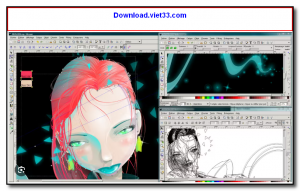
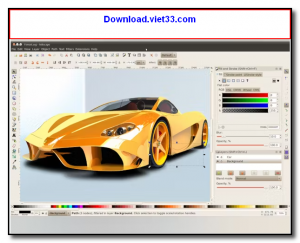
Inkscape provides a comprehensive set of drawing tools including bezier curves, spiro curves, text tools, shape generators, and a powerful node editor for precise path manipulation. Its support for layers, groups, gradients, patterns, filters, and transparency makes it capable of handling both simple illustrations and complex multi-layer design projects.
As a direct open-source alternative to Adobe Illustrator and CorelDRAW, Inkscape is widely adopted in the creative community for logo design, icon creation, technical illustrations, typography, and web graphics. It supports import and export of dozens of formats including PDF, EPS, AI, PNG, DXF, and TIFF.
Key Features
- Full SVG 1.1 support as the native file format for web-compatible vector graphics.
- Comprehensive drawing tools: bezier, spiro, calligraphy, text, shapes, and spray tools.
- Advanced node editor for precise path manipulation and bezier curve control.
- Layers, groups, clipping masks, and object grouping for complex project organization.
- Gradients, patterns, filters, and transparency effects for rich visual styling.
- Import and export support for PDF, EPS, AI (Illustrator), PNG, DXF, TIFF, and more.
- Free and open source under the GNU GPL license, available for Windows, macOS, and Linux.
How to Install
- Download the Inkscape installer for your operating system from the link below.
- On Windows, run the .exe installer and follow the setup wizard.
- On macOS, open the .dmg and drag Inkscape to your Applications folder.
- On Linux, install via your package manager: sudo apt install inkscape or download the AppImage.
- Launch Inkscape, open an SVG file or start a new document, and begin designing with the toolbar tools on the left.
Frequently Asked Questions about Inkscape – Free Professional Vector Graphics Editor
Is Inkscape – Free Professional Vector Graphics Editor free?
Inkscape – Free Professional Vector Graphics Editor is completely free to download and use — no registration or payment required.
What are the system requirements for Inkscape – Free Professional Vector Graphics Editor?
Minimum requirements: Windows 7/10/11. A modern PC with at least 2GB RAM is recommended.
What is the latest version of Inkscape – Free Professional Vector Graphics Editor?
The latest version is 1.4.2, updated on 24/09/2025.
Is Inkscape – Free Professional Vector Graphics Editor safe to download?
Yes. All software listed on download.viet33.com is sourced directly from the official developer and verified before publishing. No bundled adware or malware.
Does Inkscape – Free Professional Vector Graphics Editor work on Windows 11?
Yes, Inkscape – Free Professional Vector Graphics Editor is compatible with Windows 7/10/11, including Windows 11.
 Download Foxit PDF Reader 2026.1.2
47 Downloads
Download Foxit PDF Reader 2026.1.2
47 Downloads
 Download Bluesofts AccHelper 3.1.0
46 Downloads
Download Bluesofts AccHelper 3.1.0
46 Downloads
 Download Microsoft Office 365 Professional Plus
46 Downloads
Download Microsoft Office 365 Professional Plus
46 Downloads
 Download Microsoft Excel 2016
51 Downloads
Download Microsoft Excel 2016
51 Downloads
 Download Adobe Reader XI 11.0.23
51 Downloads
Download Adobe Reader XI 11.0.23
51 Downloads


