
Deskflow is a free, open-source keyboard and mouse sharing software that lets you control multiple computers with a single keyboard and mouse. Move your cursor to the edge of one screen and it seamlessly transitions to the next computer — no hardware KVM switch required. It works across Windows, macOS, and Linux, making it ideal for mixed-OS multi-computer setups.
Deskflow is the community-maintained continuation of the Synergy project, preserving the core functionality while remaining fully free and open-source. It uses your local network to relay input events from the server machine (where the keyboard and mouse are plugged in) to client machines, with optional SSL encryption for secure operation.
Whether you are a developer with multiple workstations, a content creator juggling a laptop and desktop, or an IT admin managing several machines, Deskflow eliminates the clutter of multiple keyboards and mice with a simple, elegant software solution.
Key Features
- Share one keyboard and mouse across multiple computers on your local network
- Seamless cursor transition between screens by moving to the screen edge
- Cross-platform — works between Windows, macOS, and Linux machines simultaneously
- Clipboard sharing — copy on one computer, paste on another
- Optional SSL/TLS encryption for secure input relay over the network
- Configurable screen layout to match your physical monitor arrangement
- Free and open-source, actively maintained by the community
How to Install
- Click the download button below to get the Deskflow installer for your operating system.
- Install Deskflow on all computers you want to link together.
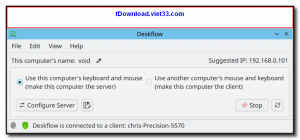
- On your primary computer (the one with the keyboard and mouse), set it as the Server in the configuration.
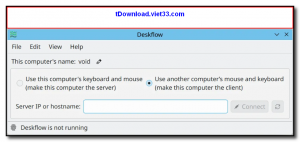
- On each secondary computer, set it as a Client and enter the server’s IP address.
- Configure the screen layout to match your physical setup and click Start — your devices are now linked.
Frequently Asked Questions about Deskflow – Free Keyboard and Mouse Sharing Across Multiple Computers
Is Deskflow – Free Keyboard and Mouse Sharing Across Multiple Computers free?
Deskflow – Free Keyboard and Mouse Sharing Across Multiple Computers is completely free to download and use — no registration or payment required.
What are the system requirements for Deskflow – Free Keyboard and Mouse Sharing Across Multiple Computers?
Minimum requirements: Windows7,8,10,11. A modern PC with at least 2GB RAM is recommended.
What is the latest version of Deskflow – Free Keyboard and Mouse Sharing Across Multiple Computers?
The latest version is 1.24.0, updated on 20/10/2025.
Is Deskflow – Free Keyboard and Mouse Sharing Across Multiple Computers safe to download?
Yes. All software listed on download.viet33.com is sourced directly from the official developer and verified before publishing. No bundled adware or malware.
Does Deskflow – Free Keyboard and Mouse Sharing Across Multiple Computers work on Windows 11?
Yes, Deskflow – Free Keyboard and Mouse Sharing Across Multiple Computers is compatible with Windows7,8,10,11, including Windows 11.
 Download Foxit PDF Reader 2026.1.2
47 Downloads
Download Foxit PDF Reader 2026.1.2
47 Downloads
 Download Bluesofts AccHelper 3.1.0
46 Downloads
Download Bluesofts AccHelper 3.1.0
46 Downloads
 Download Microsoft Office 365 Professional Plus
46 Downloads
Download Microsoft Office 365 Professional Plus
46 Downloads
 Download Microsoft Excel 2016
51 Downloads
Download Microsoft Excel 2016
51 Downloads
 Download Adobe Reader XI 11.0.23
51 Downloads
Download Adobe Reader XI 11.0.23
51 Downloads


