
CadQuery is a free, open-source Python library for building parametric 3D CAD models through code. Built on top of the powerful Open CASCADE geometry kernel (via pythonOCC), CadQuery enables engineers, product designers, and developers to create precise 3D models programmatically — making it an excellent alternative to GUI-based CAD tools for automated, repeatable, or script-driven design workflows.
Unlike traditional CAD software, CadQuery models are defined entirely in Python, enabling version control, parametric customization, and integration into larger automated workflows. A single CadQuery script can generate dozens of model variants by simply changing parameter values, making it ideal for mechanical engineering, 3D printing design, and manufacturing automation.
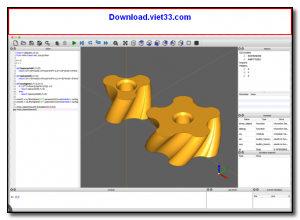
CadQuery exports models to STEP, STL, SVG, DXF, and other standard formats. It integrates with CQ-editor, a lightweight graphical IDE that provides real-time 3D preview as you type code, making the development experience smooth and visual.
Key Features
- Python-based parametric 3D CAD modeling using the Open CASCADE geometry kernel.
- Fluent, chainable API for creating complex solid models with minimal code.
- Parametric design — change values in your script to instantly generate model variants.
- Exports to STEP, STL, SVG, DXF, and other standard CAD and manufacturing formats.
- Integrates with CQ-editor for real-time 3D preview while coding.
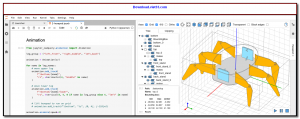
- Works in Jupyter notebooks for interactive modeling and documentation.
- Open source under the Apache 2.0 license — free for personal and commercial use.
How to Install
- Install CadQuery via conda: conda install -c conda-forge cadquery
- Alternatively, install with pip: pip install cadquery
- To get the visual IDE, download and install CQ-editor from the link below.
- Launch CQ-editor, write your CadQuery Python script in the left panel, and see the 3D model update live on the right.
- Use cq.exporters.export(result, “model.step”) to export your model to STEP or other formats.
Frequently Asked Questions about CadQuery – Python-Based Parametric 3D CAD Modeling Library
Is CadQuery – Python-Based Parametric 3D CAD Modeling Library free?
CadQuery – Python-Based Parametric 3D CAD Modeling Library is completely free to download and use — no registration or payment required.
What are the system requirements for CadQuery – Python-Based Parametric 3D CAD Modeling Library?
Minimum requirements: Windows 7/10/11. A modern PC with at least 2GB RAM is recommended.
What is the latest version of CadQuery – Python-Based Parametric 3D CAD Modeling Library?
The latest version is 2.5.2, updated on 02/10/2025.
Is CadQuery – Python-Based Parametric 3D CAD Modeling Library safe to download?
Yes. All software listed on download.viet33.com is sourced directly from the official developer and verified before publishing. No bundled adware or malware.
Does CadQuery – Python-Based Parametric 3D CAD Modeling Library work on Windows 11?
Yes, CadQuery – Python-Based Parametric 3D CAD Modeling Library is compatible with Windows 7/10/11, including Windows 11.
 Download Foxit PDF Reader 2026.1.2
47 Downloads
Download Foxit PDF Reader 2026.1.2
47 Downloads
 Download Bluesofts AccHelper 3.1.0
46 Downloads
Download Bluesofts AccHelper 3.1.0
46 Downloads
 Download Microsoft Office 365 Professional Plus
46 Downloads
Download Microsoft Office 365 Professional Plus
46 Downloads
 Download Microsoft Excel 2016
51 Downloads
Download Microsoft Excel 2016
51 Downloads
 Download Adobe Reader XI 11.0.23
51 Downloads
Download Adobe Reader XI 11.0.23
51 Downloads


