
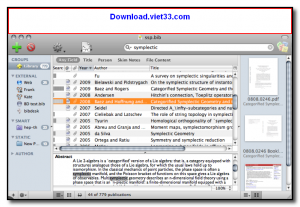
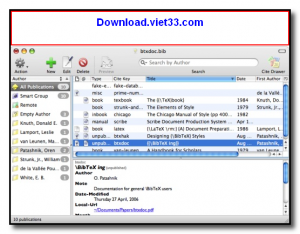
BibDesk is a free, open-source bibliography and reference management application for macOS, designed to help researchers, academics, and students organize their literature collections and manage BibTeX references for use in LaTeX documents. It provides a graphical interface for creating, editing, and searching BibTeX databases while maintaining full compatibility with LaTeX workflows.
BibDesk stores references in the standard BibTeX format, which is the most widely used bibliography format in academic publishing, particularly in mathematics, computer science, and the natural sciences. Users can attach PDFs and other files directly to their references, enabling a complete research library with linked full-text documents.
The application integrates with LaTeX editors such as TeXShop and TeXworks, allowing researchers to drag and drop citation keys directly into their LaTeX documents. BibDesk also supports searching and importing references from online databases via the built-in search and import functionality.
Key Features
- Manage BibTeX bibliographies with a clean graphical interface for academic references.
- Attach PDFs and other files to references for a complete linked research library.
- Smart groups and custom sorting for organizing large reference collections.
- Full-text search across all reference fields including attached file contents.
- Drag-and-drop citation key insertion into LaTeX documents via TeXShop integration.
- Import references from PubMed, arXiv, JSTOR, and other academic databases.
- Free and open source under the BSD license, available exclusively for macOS.
How to Install
- Download the BibDesk DMG file from the link below.
- Open the DMG and drag BibDesk.app to your Applications folder.
- Launch BibDesk from Applications or Spotlight.
- Create a new bibliography via File → New or open an existing .bib file.
- Add references manually or import them from online databases via File → Import.
Frequently Asked Questions about BibDesk – Free Bibliography and Reference Manager for macOS
Is BibDesk – Free Bibliography and Reference Manager for macOS free?
BibDesk – Free Bibliography and Reference Manager for macOS is completely free to download and use — no registration or payment required.
What are the system requirements for BibDesk – Free Bibliography and Reference Manager for macOS?
Minimum requirements: Mac os. A modern PC with at least 2GB RAM is recommended.
What is the latest version of BibDesk – Free Bibliography and Reference Manager for macOS?
The latest version is 1.8.2, updated on 13/09/2025.
Is BibDesk – Free Bibliography and Reference Manager for macOS safe to download?
Yes. All software listed on download.viet33.com is sourced directly from the official developer and verified before publishing. No bundled adware or malware.
Does BibDesk – Free Bibliography and Reference Manager for macOS work on Windows 11?
Yes, BibDesk – Free Bibliography and Reference Manager for macOS is compatible with Mac os, including Windows 11.
 Download Foxit PDF Reader 2026.1.2
47 Downloads
Download Foxit PDF Reader 2026.1.2
47 Downloads
 Download Bluesofts AccHelper 3.1.0
46 Downloads
Download Bluesofts AccHelper 3.1.0
46 Downloads
 Download Microsoft Office 365 Professional Plus
46 Downloads
Download Microsoft Office 365 Professional Plus
46 Downloads
 Download Microsoft Excel 2016
51 Downloads
Download Microsoft Excel 2016
51 Downloads
 Download Adobe Reader XI 11.0.23
51 Downloads
Download Adobe Reader XI 11.0.23
51 Downloads


