
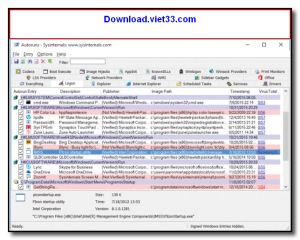
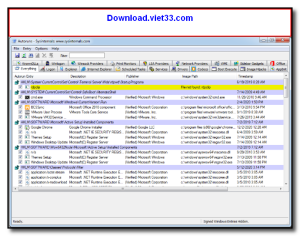
Autoruns is a powerful Windows Sysinternals utility from Microsoft that gives you complete visibility and control over every program, driver, and service configured to run automatically when Windows starts. It shows far more startup locations than any other tool, including registry keys, scheduled tasks, browser extensions, and more.
Security professionals and system administrators rely on Autoruns to detect and remove malware, adware, and unwanted software that hides in obscure startup locations. Its color-coded display instantly highlights entries that are suspicious, unsigned, or not found on disk.
Autoruns is portable and requires no installation, making it an essential tool for system troubleshooting, malware analysis, and performance optimization on any Windows PC.
Key Features
- Shows all auto-start programs across 30+ startup locations in Windows
- Color-coded entries highlight unsigned, missing, or suspicious items
- One-click disable or delete of any startup entry without uninstalling
- VirusTotal integration to scan entries for malware online
- Filter by publisher, path, or category for fast analysis
- Compare snapshots to detect changes made by malware or installers
- Portable — no installation required, runs as Administrator
How to Install
- Click the download button above to get the Autoruns archive.
- Extract the ZIP file to any folder on your computer.
- Right-click Autoruns.exe and select “Run as Administrator” for full access.
- Wait for the scan to complete — all startup entries will be displayed.
- Uncheck any entry to disable it, or right-click to delete it permanently.
Frequently Asked Questions about Autoruns
Is Autoruns free?
Autoruns is completely free to download and use — no registration or payment required.
What are the system requirements for Autoruns?
Minimum requirements: Windows7,8,10,11. A modern PC with at least 2GB RAM is recommended.
What is the latest version of Autoruns?
The latest version is 13.95, updated on 30/12/2025.
Is Autoruns safe to download?
Yes. All software listed on download.viet33.com is sourced directly from the official developer and verified before publishing. No bundled adware or malware.
Does Autoruns work on Windows 11?
Yes, Autoruns is compatible with Windows7,8,10,11, including Windows 11.
 Download DesktopCalendar 2.3.108.5601
87 Downloads
Download DesktopCalendar 2.3.108.5601
87 Downloads
 Download Hard Disk Sentinel 6.40
73 Downloads
Download Hard Disk Sentinel 6.40
73 Downloads
 Download Windows 10
57 Downloads
Download Windows 10
57 Downloads
 Download HWMonitor 1.66
95 Downloads
Download HWMonitor 1.66
95 Downloads
 Download KeyTweak 2.3.0
64 Downloads
Download KeyTweak 2.3.0
64 Downloads


