
Getting straight answers about your PC’s temperatures is easy once you download HWMonitor, a small utility from CPUID that pulls live sensor data straight from your motherboard, graphics card, and storage devices. No more guessing whether that fan noise means something’s actually overheating.
PC builders, overclockers, and anyone troubleshooting a hot or unstable system rely on it because it shows real numbers instead of vague warnings. It’s especially useful right after building a new PC, when you want to confirm everything is running within safe limits before pushing it hard.
Key Features of HWMonitor
- Reads temperature, voltage, and fan speed sensors across motherboards, GPUs, and drives
- Hotspot temperature monitoring for modern NVIDIA and AMD graphics cards
- Real-time graphing of any sensor value over time
- Transparent graph window that can float over other apps
- Improved voltage regulator monitoring for recent Intel platforms
- Pro edition adds remote monitoring over TCP/IP and logging with graph exports
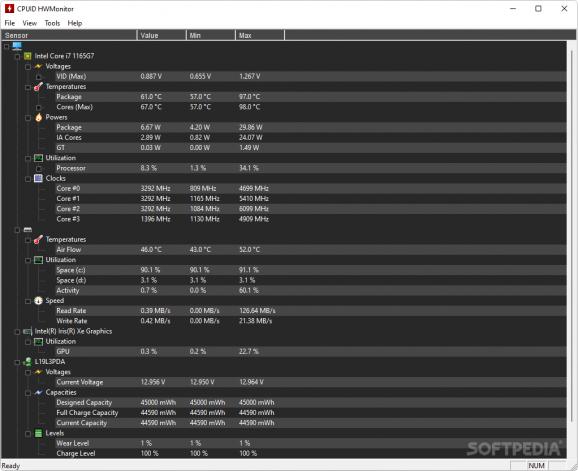
Screenshot / Demo
How to Install HWMonitor
- Click the download link above to get the HWMonitor ZIP or installer.
- Extract or run the installer, no complicated setup required.
- Launch HWMonitor.exe to open the program.
- Expand each hardware category to view live sensor readings.
- Keep it running in the background while gaming or benchmarking to watch for temperature spikes.
Enjoy using HWMonitor!
 Download KeyTweak 2.3.0
13 Downloads
Download KeyTweak 2.3.0
13 Downloads
 Download Hiren’s BootCD PE 1.0.8
12 Downloads
Download Hiren’s BootCD PE 1.0.8
12 Downloads
 Download Revo Uninstaller Portable 2.7.0
27 Downloads
Download Revo Uninstaller Portable 2.7.0
27 Downloads
 Download FurMark 2.10.2
29 Downloads
Download FurMark 2.10.2
29 Downloads
 Download CrystalDiskInfo 9.9.2
28 Downloads
Download CrystalDiskInfo 9.9.2
28 Downloads

