
If you want to download Windows 10, here’s what you should know before you do: it’s still one of the most widely used desktop operating systems around, valued for its familiar Start menu, wide hardware compatibility, and years of stability testing behind it.
It suits users who prefer a proven, well-understood interface over chasing every new feature, along with anyone running older hardware that isn’t quite ready for a newer release. Microsoft distributes the official ISO for free through its own site, with a genuine license required only to remove the activation watermark and unlock full personalization options.
Key Features of Windows 10
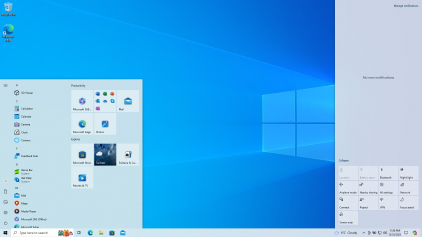
- Familiar Start menu combining a traditional list with resizable live tiles
- Virtual desktops for organizing different tasks or projects separately
- Built-in Windows Hello for signing in with your face, fingerprint, or PIN
- Windows Subsystem for Linux, letting you run a real Linux environment alongside Windows
- Broad hardware and software compatibility built up over years of updates
- Microsoft Store for apps, alongside support for traditional desktop software
Screenshot / Demo

How to Install Windows 10
- Click the download link above to reach Microsoft’s official download page.
- Use the Media Creation Tool to build a bootable USB drive, or download the ISO directly.
- Boot your PC from the USB drive or mounted ISO.
- Follow the setup wizard, choosing your language, edition, and disk to install on.
- Sign in with a Microsoft account and enter a product key when prompted to activate.
Enjoy using Windows 10!
 Download DesktopCalendar 2.3.108.5601
6 Downloads
Download DesktopCalendar 2.3.108.5601
6 Downloads
 Download Hard Disk Sentinel 6.40
9 Downloads
Download Hard Disk Sentinel 6.40
9 Downloads
 Download HWMonitor 1.66
17 Downloads
Download HWMonitor 1.66
17 Downloads
 Download KeyTweak 2.3.0
17 Downloads
Download KeyTweak 2.3.0
17 Downloads
 Download Hiren’s BootCD PE 1.0.8
18 Downloads
Download Hiren’s BootCD PE 1.0.8
18 Downloads


