
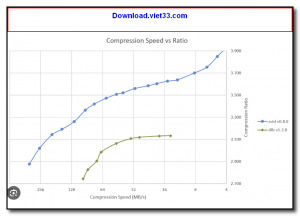
Zstandard (zstd) is a fast lossless data compression algorithm and tool developed by Facebook (Meta), designed to offer the ideal balance between compression ratio and speed. It significantly outperforms classic formats like gzip and bzip2 in decompression speed while achieving comparable or better compression ratios, making it one of the most widely adopted modern compression standards.
Zstandard operates across a wide range of compression levels (1 to 22), allowing users to fine-tune the trade-off between speed and compression ratio for their specific use case. At its default level (3), it compresses and decompresses data several times faster than gzip while achieving better compression ratios. At higher levels, it approaches the compression efficiency of LZMA while remaining much faster to decompress.
Zstandard is now used in Linux kernels, Facebook’s infrastructure, PyPI package distribution, ArchLinux, and many databases and file systems. It provides a C library (libzstd) for integration into applications and a command-line tool (zstd) for direct file compression, along with streaming and dictionary-based compression for small data blocks.
Key Features
- Extremely fast decompression speeds — multiple times faster than gzip and bzip2.
- Wide compression level range (1–22) for flexible speed vs. ratio trade-offs.
- Dictionary compression for excellent compression ratios on small data blocks.
- Streaming compression support for real-time data pipelines.
- C library (libzstd) for easy integration into applications and databases.
- Multi-threaded compression support for parallel processing of large files.
- Open source under BSD and GPL licenses — free for personal and commercial use.
How to Install
- Download the Zstandard binary package for your operating system from the link below.
- On Linux, install via your package manager: apt install zstd or yum install zstd.
- On Windows, extract the ZIP and add the zstd.exe directory to your system PATH.
- To compress a file: zstd filename (creates filename.zst).
- To decompress: zstd -d filename.zst — use -19 for maximum compression or -1 for fastest speed.
Frequently Asked Questions about Zstandard – Fast Lossless Data Compression Tool by Meta
Is Zstandard – Fast Lossless Data Compression Tool by Meta free?
Zstandard – Fast Lossless Data Compression Tool by Meta is completely free to download and use — no registration or payment required.
What are the system requirements for Zstandard – Fast Lossless Data Compression Tool by Meta?
Minimum requirements: Windows7,8,10,11. A modern PC with at least 2GB RAM is recommended.
What is the latest version of Zstandard – Fast Lossless Data Compression Tool by Meta?
The latest version is 1.5.7, updated on 30/09/2025.
Is Zstandard – Fast Lossless Data Compression Tool by Meta safe to download?
Yes. All software listed on download.viet33.com is sourced directly from the official developer and verified before publishing. No bundled adware or malware.
Does Zstandard – Fast Lossless Data Compression Tool by Meta work on Windows 11?
Yes, Zstandard – Fast Lossless Data Compression Tool by Meta is compatible with Windows7,8,10,11, including Windows 11.
 Download DesktopCalendar 2.3.108.5601
87 Downloads
Download DesktopCalendar 2.3.108.5601
87 Downloads
 Download Hard Disk Sentinel 6.40
73 Downloads
Download Hard Disk Sentinel 6.40
73 Downloads
 Download Windows 10
57 Downloads
Download Windows 10
57 Downloads
 Download Sound Booster 1.2
57 Downloads
Download Sound Booster 1.2
57 Downloads
 Download 3DP Chip 26.06
70 Downloads
Download 3DP Chip 26.06
70 Downloads


