
WSA PacMan is a free, open-source graphical tool for managing Android applications on Windows through the Windows Subsystem for Android (WSA). It provides a simple drag-and-drop interface for sideloading APK files onto WSA, eliminating the need to use command-line ADB commands every time you want to install an Android app on Windows 11.
With WSA PacMan, you can install, uninstall, and manage Android apps on your Windows 11 PC just as easily as installing native Windows applications. The tool communicates with WSA via ADB (Android Debug Bridge) automatically in the background, handling connection setup without requiring any manual configuration from the user.
WSA PacMan is particularly useful for users who want to run Android apps on Windows 11 using the Amazon Appstore or custom APKs from outside the official store. It supports batch APK installation and provides a clean overview of all installed Android packages on your WSA instance.
Key Features
- Drag-and-drop APK installation for Windows Subsystem for Android — no ADB knowledge needed.
- Automatic ADB connection setup to WSA with no manual configuration required.
- View and manage all installed Android apps on your WSA instance.
- Uninstall Android apps directly from the WSA PacMan interface.
- Batch APK installation for installing multiple apps at once.
- Lightweight and portable — no installation required, runs as a standalone executable.
- Open source under the MIT license — free to use and modify.
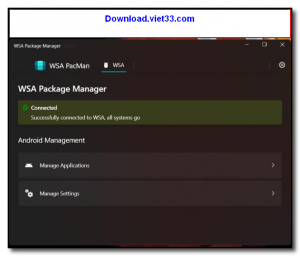
How to Install
- Ensure Windows Subsystem for Android is installed and running on your Windows 11 PC.
- In WSA settings, enable Developer Mode to allow ADB connections.
- Download the WSA PacMan executable from the link below.
- Run WSAPacMan.exe — it will automatically connect to WSA via ADB.
- Drag and drop an APK file onto the window, or click Install APK to browse and install Android apps.
Frequently Asked Questions about WSA PacMan – APK Installer and Manager for Windows Subsystem for Android
Is WSA PacMan – APK Installer and Manager for Windows Subsystem for Android free?
WSA PacMan – APK Installer and Manager for Windows Subsystem for Android is completely free to download and use — no registration or payment required.
What are the system requirements for WSA PacMan – APK Installer and Manager for Windows Subsystem for Android?
Minimum requirements: Windows10,11. A modern PC with at least 2GB RAM is recommended.
What is the latest version of WSA PacMan – APK Installer and Manager for Windows Subsystem for Android?
The latest version is 1.5.0, updated on 01/10/2025.
Is WSA PacMan – APK Installer and Manager for Windows Subsystem for Android safe to download?
Yes. All software listed on download.viet33.com is sourced directly from the official developer and verified before publishing. No bundled adware or malware.
Does WSA PacMan – APK Installer and Manager for Windows Subsystem for Android work on Windows 11?
Yes, WSA PacMan – APK Installer and Manager for Windows Subsystem for Android is compatible with Windows10,11, including Windows 11.
 Download DesktopCalendar 2.3.108.5601
87 Downloads
Download DesktopCalendar 2.3.108.5601
87 Downloads
 Download Hard Disk Sentinel 6.40
73 Downloads
Download Hard Disk Sentinel 6.40
73 Downloads
 Download Windows 10
57 Downloads
Download Windows 10
57 Downloads
 Download Sound Booster 1.2
57 Downloads
Download Sound Booster 1.2
57 Downloads
 Download 3DP Chip 26.06
71 Downloads
Download 3DP Chip 26.06
71 Downloads


