
Download Weeny Free Video Cutter and trim or split video files quickly and easily without re-encoding. Weeny Free Video Cutter is a straightforward video trimming tool that lets you cut unwanted parts from the beginning, middle, or end of any video file — preserving the original quality since no re-encoding is required.
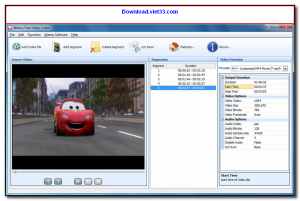
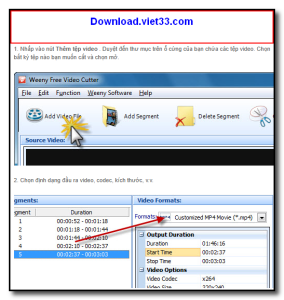
Weeny Free Video Cutter supports a wide range of video formats including MP4, AVI, MKV, MOV, FLV, and more. You simply load your video, set the start and end points using the timeline slider, and export the cut segment in seconds. The process is lossless, meaning your video quality stays exactly the same.
Whether you need to remove intros, trim long recordings, or extract a specific clip from a longer video, Download Weeny Free Video Cutter provides the quickest, simplest solution for basic video cutting on Windows.
Key Features of Weeny Free Video Cutter
- Lossless video cutting — no re-encoding means no quality loss
- Supports MP4, AVI, MKV, MOV, FLV, WMV, and other popular formats
- Visual timeline with preview for precise start and end point selection
- Split video into multiple segments by setting multiple cut points
- Fast processing — cuts are done in seconds regardless of file size
- Batch mode to cut multiple video files in one session
- Free to use with no watermarks, ads, or time limits
How to Install Weeny Free Video Cutter
- Click the download button below to get the Weeny Free Video Cutter installer.
- Run the setup file and follow the on-screen installation wizard.
- Accept the license agreement and choose your installation directory.
- Launch Weeny Free Video Cutter from your desktop or Start menu.
- Enjoy using Weeny Free Video Cutter!
Frequently Asked Questions about Weeny Free Video Cutter
Is Weeny Free Video Cutter free?
Weeny Free Video Cutter is completely free to download and use — no registration or payment required.
What are the system requirements for Weeny Free Video Cutter?
Minimum requirements: Windows7,8,10,11. A modern PC with at least 2GB RAM is recommended.
What is the latest version of Weeny Free Video Cutter?
The latest version is 1.3, updated on 15/01/2026.
Is Weeny Free Video Cutter safe to download?
Yes. All software listed on download.viet33.com is sourced directly from the official developer and verified before publishing. No bundled adware or malware.
Does Weeny Free Video Cutter work on Windows 11?
Yes, Weeny Free Video Cutter is compatible with Windows7,8,10,11, including Windows 11.
 Download DesktopCalendar 2.3.108.5601
87 Downloads
Download DesktopCalendar 2.3.108.5601
87 Downloads
 Download Hard Disk Sentinel 6.40
73 Downloads
Download Hard Disk Sentinel 6.40
73 Downloads
 Download Windows 10
57 Downloads
Download Windows 10
57 Downloads
 Download Sound Booster 1.2
57 Downloads
Download Sound Booster 1.2
57 Downloads
 Download 3DP Chip 26.06
71 Downloads
Download 3DP Chip 26.06
71 Downloads


