
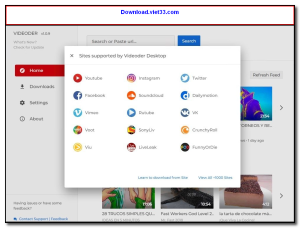
Download Videoder and enjoy a fast, reliable solution for downloading videos and music from hundreds of popular websites. Videoder is a free desktop application that lets you save content from YouTube, Facebook, Instagram, and many more platforms in just a few clicks.
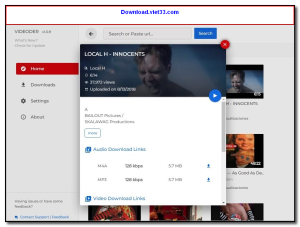
Videoder supports batch downloading, meaning you can queue multiple videos at once and let the app handle everything in the background. With its built-in search feature, you can find and download content without opening a browser.
Whether you want to save music playlists or download HD videos for offline viewing, Download Videoder delivers exceptional speed and quality. It’s the perfect tool for anyone who regularly consumes online media content.
Key Features of Videoder
- Download videos from YouTube, Facebook, Instagram, Vimeo, and 50+ sites
- Batch download multiple videos simultaneously for maximum efficiency
- Choose from multiple video quality options including 4K, 1080p, 720p, and more
- Extract audio and save as MP3 directly from video sources
- Built-in search to find content without opening a separate browser
- Download entire playlists and channels with a single click
- Clean, ad-free interface with dark mode support
How to Install Videoder
- Click the download button below to get the Videoder installer.
- Run the setup file and follow the on-screen installation wizard.
- Accept the license agreement and choose your installation directory.
- Launch Videoder from your desktop or Start menu.
- Enjoy using Videoder!
Frequently Asked Questions about Videoder
Is Videoder free?
Videoder is completely free to download and use — no registration or payment required.
What are the system requirements for Videoder?
Minimum requirements: Windows7,8,10,11. A modern PC with at least 2GB RAM is recommended.
What is the latest version of Videoder?
The latest version is 1.0.9, updated on 07/02/2026.
Is Videoder safe to download?
Yes. All software listed on download.viet33.com is sourced directly from the official developer and verified before publishing. No bundled adware or malware.
Does Videoder work on Windows 11?
Yes, Videoder is compatible with Windows7,8,10,11, including Windows 11.
 Download DesktopCalendar 2.3.108.5601
87 Downloads
Download DesktopCalendar 2.3.108.5601
87 Downloads
 Download Hard Disk Sentinel 6.40
73 Downloads
Download Hard Disk Sentinel 6.40
73 Downloads
 Download Windows 10
57 Downloads
Download Windows 10
57 Downloads
 Download Sound Booster 1.2
57 Downloads
Download Sound Booster 1.2
57 Downloads
 Download 3DP Chip 26.06
70 Downloads
Download 3DP Chip 26.06
70 Downloads


