
Viddly is a free YouTube video downloader for Windows that provides a clean, simple interface for downloading YouTube videos in your preferred quality and format. It supports downloading video in resolutions from 144p up to 4K, as well as audio-only extraction in MP3 format, making it a versatile tool for both video and music downloads.
Viddly allows you to paste a YouTube URL or use its built-in browser to find and queue videos for download. It supports batch downloading of playlists and channels, and integrates with FFmpeg for automatic post-processing and format conversion. The download queue shows real-time progress for each item with estimated time and download speed.
Unlike browser-based video downloaders, Viddly runs as a native Windows application for better performance and reliability. It is free for basic use with optional premium features for higher resolutions and simultaneous downloads.
Key Features
- Download YouTube videos in resolutions from 144p up to 4K (2160p).
- Extract audio as MP3 from any YouTube video.
- Batch download YouTube playlists and channel videos.
- Built-in YouTube browser for finding and queuing videos without leaving the app.
- FFmpeg integration for format conversion and post-processing.
- Real-time download queue with progress, speed, and time remaining indicators.
- Free to use for standard quality downloads on Windows.
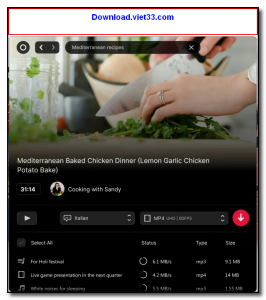
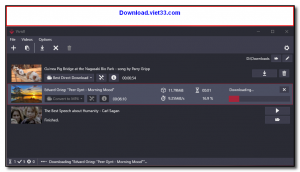
How to Install
- Download the Viddly installer from the link below.
- Run the setup file and follow the installation wizard.
- Launch Viddly and paste a YouTube URL into the search bar, or browse YouTube within the app.
- Click Download next to your chosen video, select quality and format, and confirm.
- Monitor download progress in the queue and find your completed files in the designated output folder.
Frequently Asked Questions about Viddly – Free YouTube Video Downloader for Windows
Is Viddly – Free YouTube Video Downloader for Windows free?
Viddly – Free YouTube Video Downloader for Windows is completely free to download and use — no registration or payment required.
What are the system requirements for Viddly – Free YouTube Video Downloader for Windows?
Minimum requirements: Windows7,8,10,11. A modern PC with at least 2GB RAM is recommended.
What is the latest version of Viddly – Free YouTube Video Downloader for Windows?
The latest version is 6.1.23.0, updated on 16/09/2025.
Is Viddly – Free YouTube Video Downloader for Windows safe to download?
Yes. All software listed on download.viet33.com is sourced directly from the official developer and verified before publishing. No bundled adware or malware.
Does Viddly – Free YouTube Video Downloader for Windows work on Windows 11?
Yes, Viddly – Free YouTube Video Downloader for Windows is compatible with Windows7,8,10,11, including Windows 11.
 Download DesktopCalendar 2.3.108.5601
87 Downloads
Download DesktopCalendar 2.3.108.5601
87 Downloads
 Download Hard Disk Sentinel 6.40
73 Downloads
Download Hard Disk Sentinel 6.40
73 Downloads
 Download Windows 10
57 Downloads
Download Windows 10
57 Downloads
 Download Sound Booster 1.2
57 Downloads
Download Sound Booster 1.2
57 Downloads
 Download 3DP Chip 26.06
71 Downloads
Download 3DP Chip 26.06
71 Downloads


