
SStap (SocksCap+ TAP) is a free network proxy client for Windows designed primarily for online gaming acceleration and system-wide traffic tunneling through SOCKS5 and HTTP proxies. It creates a virtual TAP network adapter to capture all TCP and UDP traffic and route it through a configured proxy server, enabling transparent proxy support for any application without per-app configuration.
Originally developed as a successor to SocksCap, SStap is popular among gamers and users in regions where certain online services require proxy access. It supports SOCKS5, HTTP, and Shadowsocks proxy protocols, and its TAP-based tunneling approach means it works with games and applications that do not natively support proxy settings.
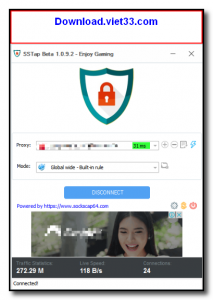
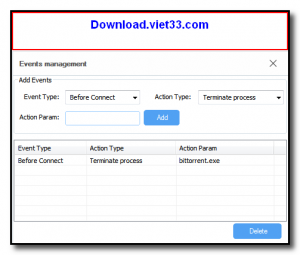
SStap offers a simple interface with a server list, one-click connection, and per-application rule configuration. Users can define which applications route through the proxy and which connect directly, giving fine-grained control over network traffic routing without affecting the entire system.
Key Features
- System-wide TCP and UDP traffic tunneling via a virtual TAP network adapter.
- Supports SOCKS5, HTTP, and Shadowsocks proxy protocols.
- Per-application routing rules to control which apps use the proxy and which connect directly.
- Optimized for online gaming with low-latency proxy routing and game acceleration.
- Simple server list management with one-click connect and disconnect.
- Works with applications that do not have built-in proxy support.
- Free to use for personal and gaming purposes.
How to Install
- Download the SStap installer from the link below.
- Run the installer as Administrator and follow the setup wizard.
- Allow the TAP network adapter driver installation when prompted by Windows.
- Launch SStap and add your SOCKS5 or Shadowsocks proxy server details.
- Select your server and click Connect to start routing traffic through the proxy.
Frequently Asked Questions about SStap – SOCKS5 System-Wide Proxy and Game Accelerator for Windows
Is SStap – SOCKS5 System-Wide Proxy and Game Accelerator for Windows free?
SStap – SOCKS5 System-Wide Proxy and Game Accelerator for Windows is completely free to download and use — no registration or payment required.
What are the system requirements for SStap – SOCKS5 System-Wide Proxy and Game Accelerator for Windows?
Minimum requirements: Windows7,8,10,11. A modern PC with at least 2GB RAM is recommended.
What is the latest version of SStap – SOCKS5 System-Wide Proxy and Game Accelerator for Windows?
The latest version is 1.0.9.3, updated on 20/09/2025.
Is SStap – SOCKS5 System-Wide Proxy and Game Accelerator for Windows safe to download?
Yes. All software listed on download.viet33.com is sourced directly from the official developer and verified before publishing. No bundled adware or malware.
Does SStap – SOCKS5 System-Wide Proxy and Game Accelerator for Windows work on Windows 11?
Yes, SStap – SOCKS5 System-Wide Proxy and Game Accelerator for Windows is compatible with Windows7,8,10,11, including Windows 11.
 Download DesktopCalendar 2.3.108.5601
87 Downloads
Download DesktopCalendar 2.3.108.5601
87 Downloads
 Download Hard Disk Sentinel 6.40
73 Downloads
Download Hard Disk Sentinel 6.40
73 Downloads
 Download Windows 10
57 Downloads
Download Windows 10
57 Downloads
 Download Sound Booster 1.2
57 Downloads
Download Sound Booster 1.2
57 Downloads
 Download 3DP Chip 26.06
70 Downloads
Download 3DP Chip 26.06
70 Downloads


