
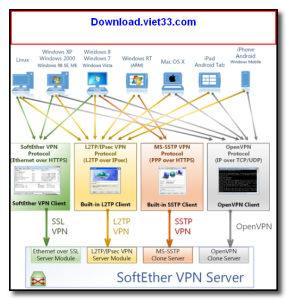
SoftEther VPN is a free, open-source, and high-performance multi-protocol VPN solution developed at the University of Tsukuba. It supports multiple VPN protocols including SSL-VPN, L2TP/IPsec, OpenVPN, and MS-SSTP, allowing it to connect to virtually any VPN server or client environment.
One of SoftEther VPN’s greatest strengths is its ability to bypass strict corporate firewalls and NAT devices by tunneling traffic over HTTPS (port 443) — a port that is almost never blocked. It also includes access to VPN Gate, a volunteer-operated network of free public VPN relay servers available worldwide.
Whether you are looking to set up your own private VPN server or connect to an existing VPN network for privacy and security, SoftEther VPN delivers unmatched flexibility, performance, and compatibility — all completely free.
Key Features
- Supports SSL-VPN, L2TP/IPsec, OpenVPN, and MS-SSTP protocols
- Bypasses firewalls using HTTPS tunneling on port 443
- Access to VPN Gate — thousands of free volunteer-run VPN servers
- High-speed performance up to 900 Mbps on modern hardware
- Built-in dynamic DNS and NAT traversal for easy server setup
- Cross-platform: Windows, Linux, macOS, FreeBSD, and Solaris
- Free and open-source under the Apache License 2.0
How to Install
- Click the download button above to get the SoftEther VPN installer.
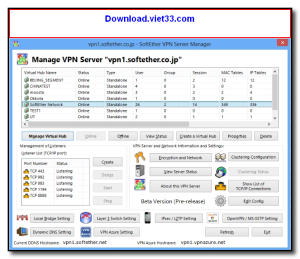
- Run the setup and choose your component: VPN Client, Server, or Bridge.
- Launch the VPN Client Manager after installation.
- Create a new VPN connection and enter your server credentials.
- Alternatively, use the VPN Gate plugin to connect to a free public VPN server.
 Download Adobe Reader XI 11.0.23
2 Downloads
Download Adobe Reader XI 11.0.23
2 Downloads
 Download Microsoft Office 2016
2 Downloads
Download Microsoft Office 2016
2 Downloads
 Download UniKey 4.6 RC2
13 Downloads
Download UniKey 4.6 RC2
13 Downloads
 Download Microsoft Word
9 Downloads
Download Microsoft Word
9 Downloads
 Download Microsoft PowerPoint Version2024
11 Downloads
Download Microsoft PowerPoint Version2024
11 Downloads


