
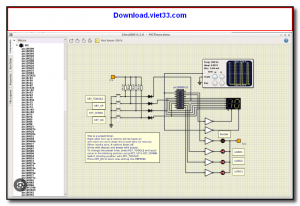
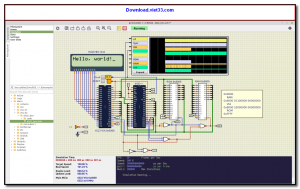
SimulIDE is a free, open-source real-time electronic circuit simulator that doubles as an integrated development environment (IDE) for programming microcontrollers. It allows students, hobbyists, and engineers to design, simulate, and test electronic circuits — including those with Arduino, AVR, PIC, and other microcontroller boards — without needing physical hardware.
The simulator provides a rich component library covering resistors, capacitors, transistors, LEDs, LCD displays, logic gates, sensors, and a wide range of microcontroller boards. Its built-in code editor supports C and assembly, with real-time simulation that lets you watch your code interact with the virtual circuit as it executes.
SimulIDE is ideal for electronics education, rapid prototyping, and debugging microcontroller firmware before deployment on real hardware. It runs on Windows, Linux, and macOS, and is regularly updated with new components and improvements by its active development community.
Key Features
- Real-time simulation of analog and digital electronic circuits with interactive components.
- Supports Arduino Uno/Mega/Nano, AVR, PIC, and other microcontroller boards.
- Built-in code editor and compiler for C and assembly programming.
- Rich component library: resistors, capacitors, transistors, LEDs, LCDs, sensors, logic gates, and more.
- Oscilloscope, voltmeter, and logic analyzer tools for signal analysis.
- Script-based automation and custom component creation via plugins.
- Cross-platform: runs on Windows, Linux, and macOS — free and open source.
How to Install
- Download the SimulIDE installer or portable package for your operating system from the link below.
- Run the installer and follow the setup wizard, or extract the portable ZIP to your preferred location.
- Launch SimulIDE from the Start Menu or the extracted folder.
- Drag components from the left panel onto the circuit board and wire them together.
- Open the code editor, write your microcontroller program, compile, and click Run to simulate.
Frequently Asked Questions about SimulIDE – Real-Time Electronics Circuit Simulator with Arduino Support
Is SimulIDE – Real-Time Electronics Circuit Simulator with Arduino Support free?
SimulIDE – Real-Time Electronics Circuit Simulator with Arduino Support is completely free to download and use — no registration or payment required.
What are the system requirements for SimulIDE – Real-Time Electronics Circuit Simulator with Arduino Support?
Minimum requirements: Windows7,8,10,11. A modern PC with at least 2GB RAM is recommended.
What is the latest version of SimulIDE – Real-Time Electronics Circuit Simulator with Arduino Support?
The latest version is 0.3.10, updated on 05/10/2025.
Is SimulIDE – Real-Time Electronics Circuit Simulator with Arduino Support safe to download?
Yes. All software listed on download.viet33.com is sourced directly from the official developer and verified before publishing. No bundled adware or malware.
Does SimulIDE – Real-Time Electronics Circuit Simulator with Arduino Support work on Windows 11?
Yes, SimulIDE – Real-Time Electronics Circuit Simulator with Arduino Support is compatible with Windows7,8,10,11, including Windows 11.
 Download DesktopCalendar 2.3.108.5601
87 Downloads
Download DesktopCalendar 2.3.108.5601
87 Downloads
 Download Hard Disk Sentinel 6.40
73 Downloads
Download Hard Disk Sentinel 6.40
73 Downloads
 Download Windows 10
57 Downloads
Download Windows 10
57 Downloads
 Download Sound Booster 1.2
57 Downloads
Download Sound Booster 1.2
57 Downloads
 Download 3DP Chip 26.06
70 Downloads
Download 3DP Chip 26.06
70 Downloads


