
Download Shutdowner and automate your PC shutdown, restart, sleep, or hibernate with a simple, powerful scheduler. Shutdowner is a lightweight Windows utility that lets you set a timer or schedule a specific time to automatically turn off your computer — perfect for long downloads, overnight tasks, or media playback.
Shutdowner runs quietly in the system tray and supports multiple shutdown actions with flexible timing options including countdown timer, specific time, and event-triggered shutdown. It can also show a warning message before executing the action, giving you a chance to cancel if needed.
Whether you want your PC to shut down after a download completes, at a scheduled time, or when the CPU becomes idle, Download Shutdowner handles it all with a clean, easy-to-use interface.
Key Features of Shutdowner
- Schedule automatic shutdown, restart, sleep, hibernate, or log off
- Countdown timer mode to shut down after a specified number of minutes
- Specific time mode to schedule actions at an exact date and time
- Warning dialog before execution so you can cancel if needed
- Idle detection to trigger shutdown when the PC is inactive
- Runs silently in the system tray with minimal resource usage
- Portable and lightweight — no complex setup required
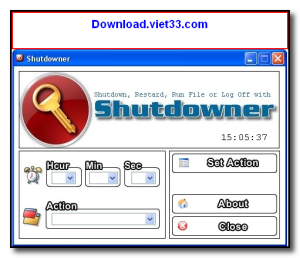
How to Install Shutdowner
- Click the download button below to get the Shutdowner installer.
- Run the setup file and follow the on-screen installation wizard.
- Accept the license agreement and choose your installation directory.
- Launch Shutdowner from your desktop or Start menu.
- Enjoy using Shutdowner!
Frequently Asked Questions about Shutdowner
Is Shutdowner free?
Shutdowner is completely free to download and use — no registration or payment required.
What are the system requirements for Shutdowner?
Minimum requirements: Windows7,8,10,11. A modern PC with at least 2GB RAM is recommended.
What is the latest version of Shutdowner?
The latest version is 2.0, updated on 14/01/2026.
Is Shutdowner safe to download?
Yes. All software listed on download.viet33.com is sourced directly from the official developer and verified before publishing. No bundled adware or malware.
Does Shutdowner work on Windows 11?
Yes, Shutdowner is compatible with Windows7,8,10,11, including Windows 11.
 Download DesktopCalendar 2.3.108.5601
87 Downloads
Download DesktopCalendar 2.3.108.5601
87 Downloads
 Download Hard Disk Sentinel 6.40
73 Downloads
Download Hard Disk Sentinel 6.40
73 Downloads
 Download Windows 10
57 Downloads
Download Windows 10
57 Downloads
 Download Sound Booster 1.2
57 Downloads
Download Sound Booster 1.2
57 Downloads
 Download 3DP Chip 26.06
70 Downloads
Download 3DP Chip 26.06
70 Downloads


