
ripgrep (rg) is an extremely fast command-line search tool that recursively searches directories for a regular expression pattern. Written in Rust by Andrew Gallant, it consistently outperforms other search tools like grep, ag (the silver searcher), and ack in real-world benchmarks — often by a significant margin.
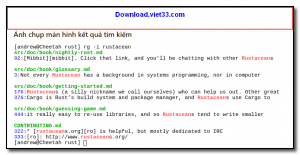
ripgrep respects your .gitignore files by default, automatically skipping binary files and hidden directories to keep results clean and relevant. It supports Unicode out of the box, handles large codebases with ease, and produces color-highlighted, line-numbered output that is easy to read in any terminal.
Whether you are searching through millions of lines of source code, log files, or documentation, ripgrep is the go-to tool for developers who value speed and precision in their workflow.
Key Features
- Extremely fast recursive search using SIMD and literal optimizations from the Rust regex engine
- Automatically respects .gitignore, .ignore, and .rgignore rules to skip irrelevant files
- Supports Perl-compatible regular expressions (PCRE2) for advanced pattern matching
- Unicode-aware search with proper handling of multi-byte character sets
- Color-highlighted output with file names, line numbers, and match context
- Search compressed files (gzip, bzip2, xz) without manual extraction
- Cross-platform — available for Windows, Linux, and macOS
How to Install
- Click the download button below to get the ripgrep binary for your operating system.
- On Windows, extract the ZIP and add the folder to your PATH environment variable.
- On macOS, install via Homebrew:
brew install ripgrep - On Linux, use your package manager:
sudo apt install ripgrepor download the binary directly. - Run
rg --versionin your terminal to confirm installation, then search withrg "pattern" /path.
Frequently Asked Questions about ripgrep – Blazing Fast Command-Line Text Search Tool
Is ripgrep – Blazing Fast Command-Line Text Search Tool free?
ripgrep – Blazing Fast Command-Line Text Search Tool is completely free to download and use — no registration or payment required.
What are the system requirements for ripgrep – Blazing Fast Command-Line Text Search Tool?
Minimum requirements: Windows7,8,10,11. A modern PC with at least 2GB RAM is recommended.
What is the latest version of ripgrep – Blazing Fast Command-Line Text Search Tool?
The latest version is 15.1.0, updated on 03/11/2025.
Is ripgrep – Blazing Fast Command-Line Text Search Tool safe to download?
Yes. All software listed on download.viet33.com is sourced directly from the official developer and verified before publishing. No bundled adware or malware.
Does ripgrep – Blazing Fast Command-Line Text Search Tool work on Windows 11?
Yes, ripgrep – Blazing Fast Command-Line Text Search Tool is compatible with Windows7,8,10,11, including Windows 11.
 Download Office Deployment Tool
58 Downloads
Download Office Deployment Tool
58 Downloads
 Download AutoIt
19755 Downloads
Download AutoIt
19755 Downloads
 Download Construct 2
19673 Downloads
Download Construct 2
19673 Downloads
 Download AEdiX Suite
20328 Downloads
Download AEdiX Suite
20328 Downloads
 Download UltraEdit
20055 Downloads
Download UltraEdit
20055 Downloads


