
QualityScaler is a free, open-source AI-powered image upscaling tool for Windows that enhances the resolution and quality of images and videos using deep learning super-resolution models. With just a few clicks, you can upscale low-resolution photos, screenshots, artwork, and video frames to 2x, 4x, or higher resolutions while preserving or enhancing fine details.
QualityScaler supports a variety of AI upscaling models including RealESRGAN, BSRGANx2, BSRGANx4, and others, allowing you to choose the best model for your specific type of content — photographs, anime illustrations, manga, or general digital art. The tool processes images on your local GPU for fast results without any cloud dependency.
QualityScaler is particularly popular among photographers, digital artists, and video creators who want to restore old photos, upscale low-resolution assets, or prepare content for high-resolution displays and printing.
Key Features
- AI-powered image upscaling at 2x, 4x, and higher resolutions using deep learning models
- Supports multiple models: RealESRGAN, BSRGANx2, BSRGANx4, and more
- Upscales photos, illustrations, anime art, manga, and screenshots with detail enhancement
- GPU-accelerated processing for fast local upscaling without cloud dependencies
- Batch processing — upscale multiple images or video frames at once
- Supports JPEG, PNG, BMP, TIFF, and other common image formats
- Free and open-source for Windows with GPU support via ONNX Runtime
How to Install
- Click the download button below to get the QualityScaler package for Windows.
- Extract the ZIP archive to any folder on your computer.
- Run QualityScaler.exe — no installation required (portable app).
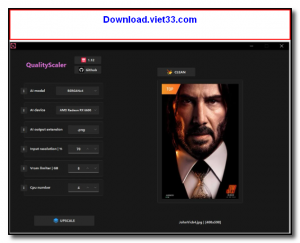
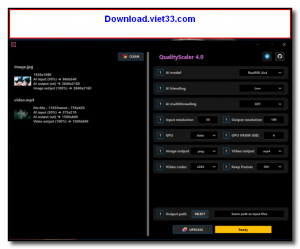
- Select your input images or folder, choose an AI model and upscale factor.
- Click Upscale and wait for the GPU to process — output images are saved to the specified folder.
Frequently Asked Questions about QualityScaler – Free AI Image Upscaling Tool for Windows
Is QualityScaler – Free AI Image Upscaling Tool for Windows free?
QualityScaler – Free AI Image Upscaling Tool for Windows is completely free to download and use — no registration or payment required.
What are the system requirements for QualityScaler – Free AI Image Upscaling Tool for Windows?
Minimum requirements: Windows7,8,10,11. A modern PC with at least 2GB RAM is recommended.
What is the latest version of QualityScaler – Free AI Image Upscaling Tool for Windows?
The latest version is 4.5, updated on 12/10/2025.
Is QualityScaler – Free AI Image Upscaling Tool for Windows safe to download?
Yes. All software listed on download.viet33.com is sourced directly from the official developer and verified before publishing. No bundled adware or malware.
Does QualityScaler – Free AI Image Upscaling Tool for Windows work on Windows 11?
Yes, QualityScaler – Free AI Image Upscaling Tool for Windows is compatible with Windows7,8,10,11, including Windows 11.
 Download DesktopCalendar 2.3.108.5601
87 Downloads
Download DesktopCalendar 2.3.108.5601
87 Downloads
 Download Hard Disk Sentinel 6.40
73 Downloads
Download Hard Disk Sentinel 6.40
73 Downloads
 Download Windows 10
57 Downloads
Download Windows 10
57 Downloads
 Download Sound Booster 1.2
57 Downloads
Download Sound Booster 1.2
57 Downloads
 Download 3DP Chip 26.06
70 Downloads
Download 3DP Chip 26.06
70 Downloads


