
PyTorch is an open-source machine learning framework developed by Meta AI that has become one of the most widely used tools for deep learning research and production deployment. It provides a flexible, Python-first approach to building neural networks with a dynamic computation graph that makes debugging and experimentation intuitive.
PyTorch supports GPU acceleration via CUDA, enabling training of large models on NVIDIA hardware at high speed. It integrates seamlessly with the Python scientific computing ecosystem, including NumPy, SciPy, and Matplotlib, making it a natural choice for data scientists and researchers.
From computer vision and natural language processing to reinforcement learning and generative AI, PyTorch powers some of the most advanced AI research in the world. It is also the backbone of popular libraries like Hugging Face Transformers, making it essential for modern AI development.
Key Features
- Dynamic computation graph for flexible and intuitive model building
- GPU acceleration via CUDA for fast model training
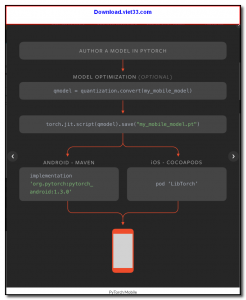
- TorchScript for converting models to production-ready static graphs
- Rich ecosystem including TorchVision, TorchText, and TorchAudio
- Seamless integration with NumPy and the Python scientific stack
- Distributed training support for multi-GPU and multi-node setups
- Large community with extensive tutorials, documentation, and pre-trained models
How to Install
- Ensure Python 3.8 or later is installed on your system.
- Visit the official PyTorch website and use the installation selector to generate the correct pip command for your OS, Python version, and hardware (CPU or CUDA).
- Run the generated command, e.g.:
pip install torch torchvision torchaudio - Verify installation by running
import torch; print(torch.__version__)in a Python shell. - Optionally install Jupyter Notebook for an interactive development environment.
Frequently Asked Questions about PyTorch
Is PyTorch free?
PyTorch is completely free to download and use — no registration or payment required.
What are the system requirements for PyTorch?
Minimum requirements: Windows7,8,10,11. A modern PC with at least 2GB RAM is recommended.
What is the latest version of PyTorch?
The latest version is 2.9.1, updated on 30/11/2025.
Is PyTorch safe to download?
Yes. All software listed on download.viet33.com is sourced directly from the official developer and verified before publishing. No bundled adware or malware.
Does PyTorch work on Windows 11?
Yes, PyTorch is compatible with Windows7,8,10,11, including Windows 11.
 Download DesktopCalendar 2.3.108.5601
87 Downloads
Download DesktopCalendar 2.3.108.5601
87 Downloads
 Download Hard Disk Sentinel 6.40
73 Downloads
Download Hard Disk Sentinel 6.40
73 Downloads
 Download Windows 10
57 Downloads
Download Windows 10
57 Downloads
 Download Sound Booster 1.2
57 Downloads
Download Sound Booster 1.2
57 Downloads
 Download 3DP Chip 26.06
70 Downloads
Download 3DP Chip 26.06
70 Downloads


