
PuTTY is the world’s most popular free SSH and Telnet client for Windows. Lightweight, portable, and incredibly reliable, it has been the go-to tool for system administrators and developers who need to connect to remote servers via SSH, Telnet, rlogin, and serial connections for over two decades.
Despite its simple interface, PuTTY packs powerful features including public key authentication, port forwarding (tunneling), X11 forwarding for running remote graphical applications, and support for a wide range of SSH encryption ciphers and protocols. It stores connection profiles for quick reconnection to frequently accessed servers.
Free, open-source, and maintained by Simon Tatham, PuTTY remains the trusted standard for SSH connectivity on Windows — used by millions of administrators, developers, and power users worldwide.
Key Features
- SSH, Telnet, rlogin, and raw TCP connection support
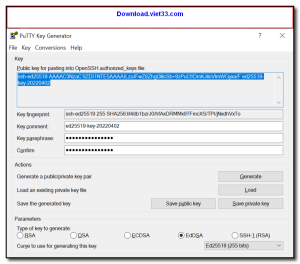
- Public key authentication with PuTTYgen for key generation and management
- SSH port forwarding (local, remote, and dynamic tunneling)
- X11 forwarding for running graphical Linux applications remotely
- Saves multiple session profiles for quick server access
- Supports IPv4 and IPv6, proxy connections, and serial port connections
- Portable — single executable, no installation required
How to Install
- Click the download button above to get the PuTTY installer or portable executable.
- Run the installer or simply run putty.exe directly — no installation needed for the portable version.
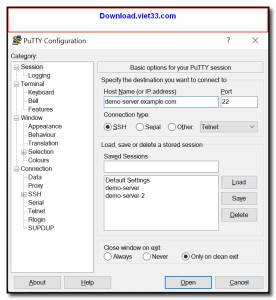
- Enter your server’s hostname or IP address in the Host Name field.
- Select “SSH” as the connection type and set the port (default: 22).
- Click “Open” to connect — enter your username and password when prompted.
Frequently Asked Questions about PuTTY
Is PuTTY free?
PuTTY is completely free to download and use — no registration or payment required.
What are the system requirements for PuTTY?
Minimum requirements: Windows7,8,10,11,32-bit,64-bit. A modern PC with at least 2GB RAM is recommended.
What is the latest version of PuTTY?
The latest version is 0.83, updated on 22/12/2025.
Is PuTTY safe to download?
Yes. All software listed on download.viet33.com is sourced directly from the official developer and verified before publishing. No bundled adware or malware.
Does PuTTY work on Windows 11?
Yes, PuTTY is compatible with Windows7,8,10,11,32-bit,64-bit, including Windows 11.
 Download DesktopCalendar 2.3.108.5601
87 Downloads
Download DesktopCalendar 2.3.108.5601
87 Downloads
 Download Hard Disk Sentinel 6.40
73 Downloads
Download Hard Disk Sentinel 6.40
73 Downloads
 Download Windows 10
57 Downloads
Download Windows 10
57 Downloads
 Download Sound Booster 1.2
57 Downloads
Download Sound Booster 1.2
57 Downloads
 Download 3DP Chip 26.06
70 Downloads
Download 3DP Chip 26.06
70 Downloads


