
Proxifier is a powerful proxy client for Windows and macOS that forces any application to use a proxy server, even if the application does not natively support proxies. It works at the network level, transparently redirecting all TCP and UDP connections from any application through your configured SOCKS or HTTPS proxy servers.
With Proxifier, you can set up flexible rules to control exactly which applications and connections are routed through which proxies, allowing you to use proxy servers selectively or for all traffic system-wide. It is widely used by developers, security researchers, and power users who need granular control over their network traffic routing.
Supporting SOCKS4, SOCKS5, and HTTPS proxy protocols with optional authentication, Proxifier is the definitive solution for routing any application through a proxy without modifying the application itself.
Key Features
- Forces any application to use a proxy — even those without native proxy support
- Supports SOCKS4, SOCKS5, and HTTPS (CONNECT) proxy protocols
- Flexible rule-based routing by application, hostname, or IP address
- Proxy chaining — route traffic through multiple proxies in sequence
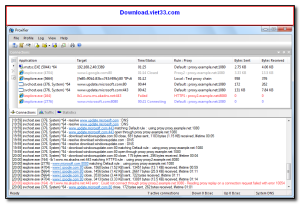
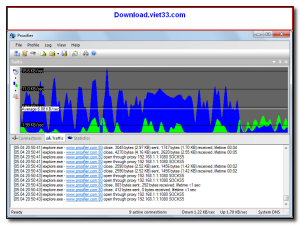
- Real-time connection log showing active connections and their proxy routes
- DNS resolution through the proxy to prevent DNS leaks
- Supports proxy authentication with username and password
How to Install
- Click the download button above to get the Proxifier installer.
- Run the setup file and follow the on-screen instructions to install.
- Launch Proxifier and go to Profile → Proxy Servers to add your proxy.
- Set up rules under Profile → Proxification Rules to control which apps use the proxy.
- All matching traffic will now be automatically routed through your proxy server.
Frequently Asked Questions about Proxifier
Is Proxifier free?
Proxifier offers a free trial period. Full features may require a paid license.
What are the system requirements for Proxifier?
Minimum requirements: Windows7,8,10,11. A modern PC with at least 2GB RAM is recommended.
What is the latest version of Proxifier?
The latest version is 4.14, updated on 21/12/2025.
Is Proxifier safe to download?
Yes. All software listed on download.viet33.com is sourced directly from the official developer and verified before publishing. No bundled adware or malware.
Does Proxifier work on Windows 11?
Yes, Proxifier is compatible with Windows7,8,10,11, including Windows 11.
 Download DesktopCalendar 2.3.108.5601
87 Downloads
Download DesktopCalendar 2.3.108.5601
87 Downloads
 Download Hard Disk Sentinel 6.40
73 Downloads
Download Hard Disk Sentinel 6.40
73 Downloads
 Download Windows 10
57 Downloads
Download Windows 10
57 Downloads
 Download Sound Booster 1.2
57 Downloads
Download Sound Booster 1.2
57 Downloads
 Download 3DP Chip 26.06
70 Downloads
Download 3DP Chip 26.06
70 Downloads


