
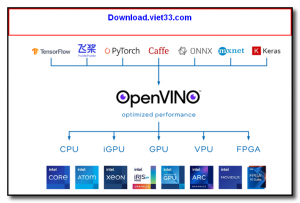
OpenVINO (Open Visual Inference and Neural Network Optimization) is a free, open-source toolkit developed by Intel for optimizing and deploying deep learning models with maximum performance across Intel hardware. It enables AI developers and engineers to accelerate inference workloads from frameworks like TensorFlow, PyTorch, ONNX, and OpenVX on Intel CPUs, integrated GPUs, VPUs, and FPGAs.
OpenVINO includes a Model Optimizer that converts trained neural network models into the Intermediate Representation (IR) format, followed by the Inference Engine that executes the optimized model at high speed on target Intel hardware. This two-step workflow significantly reduces inference latency and increases throughput compared to running native framework models directly.
The toolkit is widely used in computer vision, natural language processing, speech recognition, and recommendation system applications. OpenVINO supports deployment on edge devices, embedded systems, and cloud servers, making it a versatile solution for both embedded AI and large-scale inference.
Key Features
- Optimizes and deploys AI models from TensorFlow, PyTorch, ONNX, Caffe, and MXNet.
- Accelerates inference on Intel CPUs, integrated GPUs, VPUs (Myriad), and FPGAs.
- Model Optimizer converts and quantizes models to the optimized Intermediate Representation format.
- Inference Engine runs optimized models with maximum hardware utilization.
- Supports INT8, FP16, and FP32 precision for flexible accuracy vs. speed trade-offs.
- Pre-trained model zoo with 200+ ready-to-use models for computer vision and NLP tasks.
- Open source under the Apache 2.0 license, cross-platform for Windows, Linux, and macOS.
How to Install
- Download the OpenVINO toolkit package for your operating system from the link below.
- Run the installer or follow the pip installation: pip install openvino
- On Windows, run the setupvars.bat script to configure environment variables.
- Convert your model using the Model Optimizer: mo –input_model model.pb –output_dir output/
- Load and run the optimized IR model using the Python or C++ Inference Engine API.
Frequently Asked Questions about OpenVINO – Intel AI Inference Optimization Toolkit
Is OpenVINO – Intel AI Inference Optimization Toolkit free?
OpenVINO – Intel AI Inference Optimization Toolkit is completely free to download and use — no registration or payment required.
What are the system requirements for OpenVINO – Intel AI Inference Optimization Toolkit?
Minimum requirements: Windows7,8,10,11,32-bit,64-bit. A modern PC with at least 2GB RAM is recommended.
What is the latest version of OpenVINO – Intel AI Inference Optimization Toolkit?
The latest version is 3.7.1, updated on 19/09/2025.
Is OpenVINO – Intel AI Inference Optimization Toolkit safe to download?
Yes. All software listed on download.viet33.com is sourced directly from the official developer and verified before publishing. No bundled adware or malware.
Does OpenVINO – Intel AI Inference Optimization Toolkit work on Windows 11?
Yes, OpenVINO – Intel AI Inference Optimization Toolkit is compatible with Windows7,8,10,11,32-bit,64-bit, including Windows 11.
 Download DesktopCalendar 2.3.108.5601
87 Downloads
Download DesktopCalendar 2.3.108.5601
87 Downloads
 Download Hard Disk Sentinel 6.40
73 Downloads
Download Hard Disk Sentinel 6.40
73 Downloads
 Download Windows 10
57 Downloads
Download Windows 10
57 Downloads
 Download Sound Booster 1.2
57 Downloads
Download Sound Booster 1.2
57 Downloads
 Download 3DP Chip 26.06
70 Downloads
Download 3DP Chip 26.06
70 Downloads


