
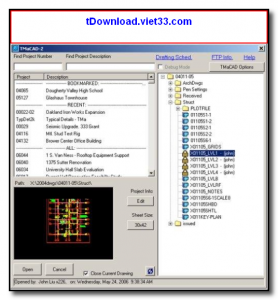
OpenDCL is a free, open-source dialog control library for AutoCAD and AutoCAD-compatible CAD applications that allows AutoLISP developers to create rich, custom dialog boxes and user interfaces. It extends AutoCAD’s built-in DCL (Dialog Control Language) with a much wider range of controls, events, and styling options, enabling the creation of professional-grade custom tools and utilities.
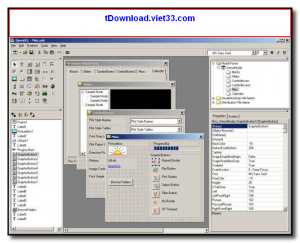
With OpenDCL, you can build dialog interfaces featuring tabs, list views, tree views, progress bars, custom buttons, image controls, and many other UI elements that are not available in standard AutoCAD DCL. The OpenDCL Studio visual editor lets you design dialogs graphically by dragging and dropping controls, without writing XML by hand.
OpenDCL is widely used by AutoCAD power users, CAD managers, and AutoLISP developers who want to build sophisticated, user-friendly tools and productivity add-ins for AutoCAD workflows.
Key Features
- Extends AutoCAD DCL with tabs, list views, tree controls, progress bars, and 60+ UI controls
- OpenDCL Studio visual dialog editor for drag-and-drop form design
- Event-driven programming model compatible with AutoLISP
- Supports custom icons, images, and styled controls for professional-looking dialogs
- Compatible with AutoCAD, BricsCAD, and other AutoCAD-compatible platforms
- Persistent dialog state — save and restore control values between sessions
- Free and open-source with active community support
How to Install
- Click the download button below to get the OpenDCL installer.
- Close AutoCAD before running the installer to avoid file conflicts.
- Run the installer and follow the setup wizard — it automatically registers OpenDCL with AutoCAD.
- Restart AutoCAD; OpenDCL loads automatically at startup.
- Use OpenDCL Studio (included) to design your dialog forms and load them via AutoLISP using the
odcl_loadfunction.
Frequently Asked Questions about OpenDCL – Custom Dialog Library for AutoCAD and AutoLISP
Is OpenDCL – Custom Dialog Library for AutoCAD and AutoLISP free?
OpenDCL – Custom Dialog Library for AutoCAD and AutoLISP is completely free to download and use — no registration or payment required.
What are the system requirements for OpenDCL – Custom Dialog Library for AutoCAD and AutoLISP?
Minimum requirements: Windows7,8,10,11. A modern PC with at least 2GB RAM is recommended.
What is the latest version of OpenDCL – Custom Dialog Library for AutoCAD and AutoLISP?
The latest version is 9.3.1.1, updated on 18/10/2025.
Is OpenDCL – Custom Dialog Library for AutoCAD and AutoLISP safe to download?
Yes. All software listed on download.viet33.com is sourced directly from the official developer and verified before publishing. No bundled adware or malware.
Does OpenDCL – Custom Dialog Library for AutoCAD and AutoLISP work on Windows 11?
Yes, OpenDCL – Custom Dialog Library for AutoCAD and AutoLISP is compatible with Windows7,8,10,11, including Windows 11.
 Download DesktopCalendar 2.3.108.5601
87 Downloads
Download DesktopCalendar 2.3.108.5601
87 Downloads
 Download Hard Disk Sentinel 6.40
73 Downloads
Download Hard Disk Sentinel 6.40
73 Downloads
 Download Windows 10
57 Downloads
Download Windows 10
57 Downloads
 Download Sound Booster 1.2
57 Downloads
Download Sound Booster 1.2
57 Downloads
 Download 3DP Chip 26.06
70 Downloads
Download 3DP Chip 26.06
70 Downloads


