
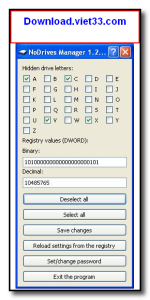
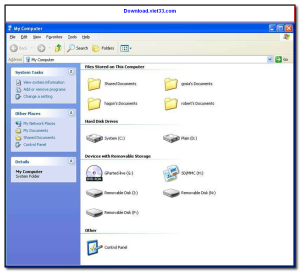
Download NoDrives Manager and control which disk drives are visible in Windows Explorer with ease. NoDrives Manager is a lightweight utility that lets you hide or show specific drives — including hard drives, USB drives, optical drives, and network shares — from Windows Explorer, keeping your system organized and your data protected from unauthorized access.
NoDrives Manager works by modifying the Windows registry NoDrives policy in a safe, reversible way. Hidden drives are not deleted or formatted — they simply become invisible in Explorer, while remaining fully accessible to applications and system processes that need them.
Whether you want to hide sensitive partitions, prevent users from accessing certain drives, or simply declutter your Explorer view, Download NoDrives Manager provides the simplest solution for drive visibility management on Windows.
Key Features of NoDrives Manager
- Hide or show any drive letter in Windows Explorer with one click
- Works with all drive types: HDD, SSD, USB, optical, and network drives
- Changes take effect immediately without requiring a system restart
- Non-destructive — hidden drives remain fully accessible to the system
- Simple checkbox interface for managing multiple drives at once
- Portable version available — no installation required
- Supports all versions of Windows including Windows 10 and 11
How to Install NoDrives Manager
- Click the download button below to get the NoDrives Manager installer.
- Run the setup file and follow the on-screen installation wizard.
- Accept the license agreement and choose your installation directory.
- Launch NoDrives Manager from your desktop or Start menu.
- Enjoy using NoDrives Manager!
Frequently Asked Questions about NoDrives Manager
Is NoDrives Manager free?
NoDrives Manager is completely free to download and use — no registration or payment required.
What are the system requirements for NoDrives Manager?
Minimum requirements: Windows7,8,10,11. A modern PC with at least 2GB RAM is recommended.
What is the latest version of NoDrives Manager?
The latest version is 1.2.0, updated on 12/01/2026.
Is NoDrives Manager safe to download?
Yes. All software listed on download.viet33.com is sourced directly from the official developer and verified before publishing. No bundled adware or malware.
Does NoDrives Manager work on Windows 11?
Yes, NoDrives Manager is compatible with Windows7,8,10,11, including Windows 11.
 Download DesktopCalendar 2.3.108.5601
87 Downloads
Download DesktopCalendar 2.3.108.5601
87 Downloads
 Download Hard Disk Sentinel 6.40
73 Downloads
Download Hard Disk Sentinel 6.40
73 Downloads
 Download Windows 10
57 Downloads
Download Windows 10
57 Downloads
 Download Sound Booster 1.2
57 Downloads
Download Sound Booster 1.2
57 Downloads
 Download 3DP Chip 26.06
70 Downloads
Download 3DP Chip 26.06
70 Downloads


