
Download Nmap (Network Mapper) and discover hosts, services, and security vulnerabilities across your network with the world’s most trusted open-source network scanner. Nmap is used by network administrators, security professionals, and system auditors to map network topology, identify open ports, and detect running services.
Nmap works by sending specially crafted packets to target hosts and analyzing their responses. It can scan thousands of hosts simultaneously and provides detailed information about operating systems, software versions, firewall rules, and potential security weaknesses.
From quick single-host checks to comprehensive enterprise network audits, Download Nmap delivers the flexibility, speed, and accuracy that make it the gold standard for network discovery and security scanning on Windows, Linux, and macOS.
Key Features of Nmap
- Host discovery to identify active devices across any network range
- Port scanning to detect open, closed, and filtered TCP/UDP ports
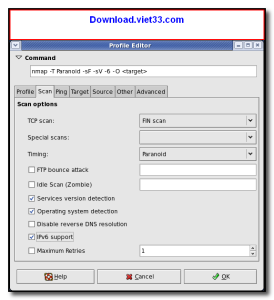
- OS detection to identify operating systems and hardware types
- Version detection for services running on open ports
- Nmap Scripting Engine (NSE) for advanced vulnerability detection and automation
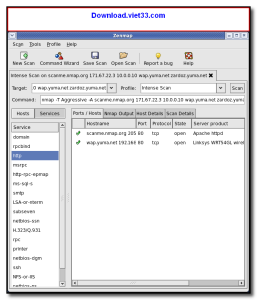
- Zenmap GUI for visual network mapping and scan management
- Supports IPv4 and IPv6 scanning across local and remote networks
How to Install Nmap
- Click the download button below to get the Nmap installer.
- Run the setup file and follow the on-screen installation wizard.
- Accept the license agreement and choose your installation directory.
- Launch Nmap from the command line or use Zenmap GUI from your Start menu.
- Enjoy using Nmap!
Frequently Asked Questions about Nmap
Is Nmap free?
Nmap is completely free to download and use — no registration or payment required.
What are the system requirements for Nmap?
Minimum requirements: Windows7,8,10,11. A modern PC with at least 2GB RAM is recommended.
What is the latest version of Nmap?
The latest version is 7.98, updated on 23/01/2026.
Is Nmap safe to download?
Yes. All software listed on download.viet33.com is sourced directly from the official developer and verified before publishing. No bundled adware or malware.
Does Nmap work on Windows 11?
Yes, Nmap is compatible with Windows7,8,10,11, including Windows 11.
 Download DesktopCalendar 2.3.108.5601
87 Downloads
Download DesktopCalendar 2.3.108.5601
87 Downloads
 Download Hard Disk Sentinel 6.40
73 Downloads
Download Hard Disk Sentinel 6.40
73 Downloads
 Download Windows 10
57 Downloads
Download Windows 10
57 Downloads
 Download Sound Booster 1.2
57 Downloads
Download Sound Booster 1.2
57 Downloads
 Download 3DP Chip 26.06
70 Downloads
Download 3DP Chip 26.06
70 Downloads


