
NiceCopier is a free file copying utility for Windows that replaces the default Windows copy dialog with a smarter, faster, and more informative alternative. It provides real-time transfer speed graphs, accurate time remaining estimates, pause and resume support, and a queue system — all features missing from the standard Windows copy experience.
When you copy or move files in Windows Explorer, NiceCopier automatically intercepts the operation and handles it instead. The result is a much smoother experience, especially for large file transfers or copying over slow network drives, where the ability to pause and resume can save significant time and frustration.
NiceCopier is lightweight, installs quickly, and works transparently in the background. It is an essential upgrade for anyone who regularly moves large amounts of data on their Windows PC.
Key Features
- Replaces the Windows default copy dialog with a feature-rich, accurate transfer interface
- Real-time transfer speed graph and precise time remaining display
- Pause and resume file transfers at any time without losing progress
- Queue multiple copy/move operations and manage them from a single window
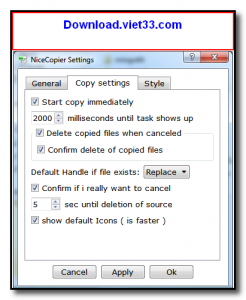
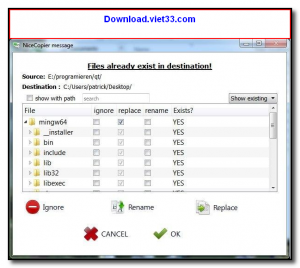
- Collision handling with options to skip, overwrite, rename, or compare files
- Error log to review failed transfers after batch operations complete
- Lightweight and transparent — integrates seamlessly into Windows Explorer workflow
How to Install
- Click the download button below to get the NiceCopier installer.
- Run the installer and follow the setup steps to complete installation.
- NiceCopier installs and activates automatically — no configuration required.
- Copy or move any file in Windows Explorer as usual; NiceCopier will handle the operation instead of the default dialog.
- Use the system tray icon to access settings and adjust preferences such as buffer size and queue behavior.
Frequently Asked Questions about NiceCopier – Smarter File Copy Utility for Windows
Is NiceCopier – Smarter File Copy Utility for Windows free?
NiceCopier – Smarter File Copy Utility for Windows is completely free to download and use — no registration or payment required.
What are the system requirements for NiceCopier – Smarter File Copy Utility for Windows?
Minimum requirements: Windows7,8,10,11. A modern PC with at least 2GB RAM is recommended.
What is the latest version of NiceCopier – Smarter File Copy Utility for Windows?
The latest version is 15.02, updated on 30/10/2025.
Is NiceCopier – Smarter File Copy Utility for Windows safe to download?
Yes. All software listed on download.viet33.com is sourced directly from the official developer and verified before publishing. No bundled adware or malware.
Does NiceCopier – Smarter File Copy Utility for Windows work on Windows 11?
Yes, NiceCopier – Smarter File Copy Utility for Windows is compatible with Windows7,8,10,11, including Windows 11.
 Download DesktopCalendar 2.3.108.5601
87 Downloads
Download DesktopCalendar 2.3.108.5601
87 Downloads
 Download Hard Disk Sentinel 6.40
73 Downloads
Download Hard Disk Sentinel 6.40
73 Downloads
 Download Windows 10
57 Downloads
Download Windows 10
57 Downloads
 Download Sound Booster 1.2
57 Downloads
Download Sound Booster 1.2
57 Downloads
 Download 3DP Chip 26.06
70 Downloads
Download 3DP Chip 26.06
70 Downloads


