
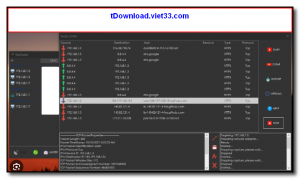
NetStalker is a free network monitoring tool for Windows that shows you every active network connection on your computer in real time. It displays the application responsible for each connection, the remote IP address and hostname, port numbers, protocol type, and connection status — giving you complete visibility into what your system is communicating with.
With NetStalker, you can quickly spot suspicious or unauthorized connections, identify which programs are consuming bandwidth, and detect potential malware or spyware phoning home to remote servers. It is a lightweight, portable tool that requires no installation and starts monitoring immediately upon launch.
NetStalker is an essential utility for privacy-conscious users, IT administrators, and security researchers who want a clear, real-time picture of their system’s network activity.
Key Features
- Displays all active TCP and UDP connections with process names and remote addresses
- Real-time updating connection list with automatic refresh intervals
- Resolves remote IP addresses to hostnames and country flags for easy identification
- Shows which application or process owns each network connection
- Color-coded connection states (established, listening, time-wait, etc.)
- Portable — runs without installation directly from a USB drive or folder
- Free to use with no registration or license required
How to Install
- Click the download button below to get the NetStalker portable executable.
- Extract the archive and run NetStalker.exe — no installation or setup required.
- The application opens and immediately begins displaying all active network connections.
- Click on any connection to see detailed information about the remote host and owning process.
- Use the filter options to search or narrow connections by application name, port, or IP address.
Frequently Asked Questions about NetStalker – Real-Time Network Connection Monitor for Windows
Is NetStalker – Real-Time Network Connection Monitor for Windows free?
NetStalker – Real-Time Network Connection Monitor for Windows is completely free to download and use — no registration or payment required.
What are the system requirements for NetStalker – Real-Time Network Connection Monitor for Windows?
Minimum requirements: Windows 7/10/11. A modern PC with at least 2GB RAM is recommended.
What is the latest version of NetStalker – Real-Time Network Connection Monitor for Windows?
The latest version is 4.1, updated on 25/10/2025.
Is NetStalker – Real-Time Network Connection Monitor for Windows safe to download?
Yes. All software listed on download.viet33.com is sourced directly from the official developer and verified before publishing. No bundled adware or malware.
Does NetStalker – Real-Time Network Connection Monitor for Windows work on Windows 11?
Yes, NetStalker – Real-Time Network Connection Monitor for Windows is compatible with Windows 7/10/11, including Windows 11.
 Download DesktopCalendar 2.3.108.5601
87 Downloads
Download DesktopCalendar 2.3.108.5601
87 Downloads
 Download Hard Disk Sentinel 6.40
73 Downloads
Download Hard Disk Sentinel 6.40
73 Downloads
 Download Windows 10
57 Downloads
Download Windows 10
57 Downloads
 Download Sound Booster 1.2
57 Downloads
Download Sound Booster 1.2
57 Downloads
 Download 3DP Chip 26.06
70 Downloads
Download 3DP Chip 26.06
70 Downloads


