
Netch is a free, open-source network traffic routing tool for Windows that supports process-based proxy routing and network game acceleration. Unlike traditional system-wide proxy clients, Netch can route traffic from specific applications or processes through a proxy while leaving other programs using the direct connection, giving users fine-grained control over their network traffic.
Netch supports multiple proxy protocols including Shadowsocks, VMess, VLESS, Trojan, SOCKS5, HTTP, and more, making it compatible with a wide range of server configurations. Its process mode feature is particularly valued by gamers who want to accelerate specific game clients through a proxy without routing all system traffic through it.
Built on the tun2socks technology and WinDivert driver, Netch operates at a low network level for efficient, reliable routing. It includes a built-in subscription management system for importing proxy server lists and supports rule-based routing for advanced traffic control scenarios.
Key Features
- Process-mode routing to proxy specific applications without affecting other traffic.
- Supports Shadowsocks, VMess, VLESS, Trojan, SOCKS5, HTTP, and more proxy protocols.
- TUN mode for system-wide transparent proxying when needed.
- Built-in subscription management for importing and updating proxy server lists.
- Game acceleration mode optimized for online gaming with low-latency routing.
- DNS over HTTPS support for secure and private DNS resolution.
- Open source under the MIT license, free to use and modify.
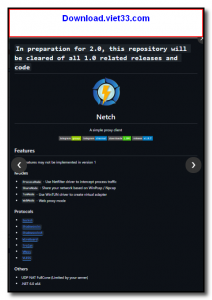
How to Install
- Download the Netch ZIP archive from the link below and extract it to a folder.
- Run Netch.exe as Administrator (required for the WinDivert network driver).
- Add your proxy servers manually or import a subscription URL via the Servers menu.
- Select a server and a mode (Process, TUN, or HTTP), then click Start.
- Netch will route the selected traffic through your proxy automatically.
Frequently Asked Questions about Netch – Process-Based Network Proxy and Game Accelerator for Windows
Is Netch – Process-Based Network Proxy and Game Accelerator for Windows free?
Netch – Process-Based Network Proxy and Game Accelerator for Windows is completely free to download and use — no registration or payment required.
What are the system requirements for Netch – Process-Based Network Proxy and Game Accelerator for Windows?
Minimum requirements: Windows7,8,10,11. A modern PC with at least 2GB RAM is recommended.
What is the latest version of Netch – Process-Based Network Proxy and Game Accelerator for Windows?
The latest version is 1.9.7, updated on 23/09/2025.
Is Netch – Process-Based Network Proxy and Game Accelerator for Windows safe to download?
Yes. All software listed on download.viet33.com is sourced directly from the official developer and verified before publishing. No bundled adware or malware.
Does Netch – Process-Based Network Proxy and Game Accelerator for Windows work on Windows 11?
Yes, Netch – Process-Based Network Proxy and Game Accelerator for Windows is compatible with Windows7,8,10,11, including Windows 11.
 Download DesktopCalendar 2.3.108.5601
87 Downloads
Download DesktopCalendar 2.3.108.5601
87 Downloads
 Download Hard Disk Sentinel 6.40
73 Downloads
Download Hard Disk Sentinel 6.40
73 Downloads
 Download Windows 10
57 Downloads
Download Windows 10
57 Downloads
 Download Sound Booster 1.2
57 Downloads
Download Sound Booster 1.2
57 Downloads
 Download 3DP Chip 26.06
70 Downloads
Download 3DP Chip 26.06
70 Downloads


