
Download My Screen Recorder and capture everything on your screen with ease. This lightweight yet powerful screen recording tool is designed for users who need a simple, effective solution without complex settings or steep learning curves.
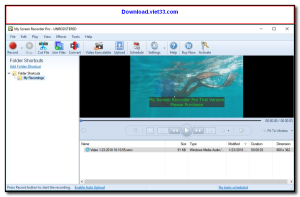
My Screen Recorder offers a clean interface that lets you start recording in seconds. Whether you’re creating tutorials, recording gameplay, or capturing presentations, this software delivers high-quality output with minimal system resource usage.
With support for multiple output formats and flexible recording modes, Download My Screen Recorder is the go-to choice for both beginners and professionals looking for a reliable screen capture tool on Windows.
Key Features of My Screen Recorder
- Record full screen, specific windows, or custom regions with a single click
- Capture system audio, microphone input, or both simultaneously
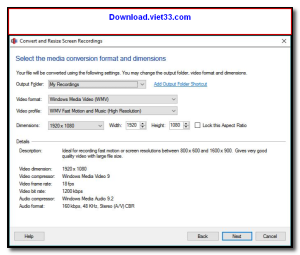
- Save recordings in AVI, MP4, WMV, and other popular video formats
- Built-in scheduler for automated recordings at specified times
- Webcam overlay support for picture-in-picture recording
- Hotkey controls for quick start, pause, and stop without switching windows
- Lightweight installer with no bundled adware or bloatware
How to Install My Screen Recorder
- Click the download button below to get the My Screen Recorder installer.
- Run the setup file and follow the on-screen installation wizard.
- Accept the license agreement and choose your installation directory.
- Launch My Screen Recorder from your desktop or Start menu.
- Enjoy using My Screen Recorder!
Frequently Asked Questions about My Screen Recorder
Is My Screen Recorder free?
My Screen Recorder offers a free trial period. Full features may require a paid license.
What are the system requirements for My Screen Recorder?
Minimum requirements: Windows7,8,10,11. A modern PC with at least 2GB RAM is recommended.
What is the latest version of My Screen Recorder?
The latest version is 5.3.2.0, updated on 08/02/2026.
Is My Screen Recorder safe to download?
Yes. All software listed on download.viet33.com is sourced directly from the official developer and verified before publishing. No bundled adware or malware.
Does My Screen Recorder work on Windows 11?
Yes, My Screen Recorder is compatible with Windows7,8,10,11, including Windows 11.
 Download DesktopCalendar 2.3.108.5601
87 Downloads
Download DesktopCalendar 2.3.108.5601
87 Downloads
 Download Hard Disk Sentinel 6.40
73 Downloads
Download Hard Disk Sentinel 6.40
73 Downloads
 Download Windows 10
57 Downloads
Download Windows 10
57 Downloads
 Download Sound Booster 1.2
57 Downloads
Download Sound Booster 1.2
57 Downloads
 Download 3DP Chip 26.06
71 Downloads
Download 3DP Chip 26.06
71 Downloads


