
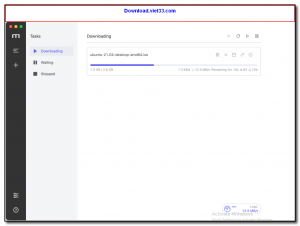
Motrix is a free, open-source, full-featured download manager with a beautiful modern interface that supports HTTP, FTP, BitTorrent, and Magnet link downloads. Built on the powerful aria2 download engine and wrapped in a clean Electron-based desktop app, Motrix provides a smooth and fast download experience across Windows, macOS, and Linux.
Motrix supports multi-threaded downloading that splits files into multiple chunks for maximum speed. It handles torrents natively, supports up to 10 simultaneous download tasks, and includes browser extensions for Chrome and Firefox to capture download links automatically. The interface is clean, intuitive, and designed with simplicity in mind.
Whether you are downloading large files, videos, software, or torrent content, Motrix provides a reliable, feature-rich experience that is completely free and open-source — making it an excellent alternative to commercial download managers.
Key Features
- Supports HTTP/HTTPS, FTP, BitTorrent, and Magnet link downloads in one app
- Multi-threaded downloading for maximum speed on supported servers
- Clean, modern interface built with Electron — no clutter, no ads
- Up to 10 simultaneous download tasks with individual speed controls
- Browser extensions for Chrome and Firefox to capture download links
- Proxy support, download scheduling, and bandwidth throttling
- Cross-platform — Windows, macOS, and Linux with a consistent UI
How to Install
- Click the download button below to get the Motrix installer for your operating system.
- Run the installer and follow the setup steps to complete installation.
- Launch Motrix — the main download manager window opens immediately.
- Add a download by clicking the + button and pasting a URL, torrent file, or Magnet link.
- Install the Motrix browser extension for Chrome or Firefox to capture downloads automatically from your browser.
Frequently Asked Questions about Motrix – Free Open-Source Download Manager for All Platforms
Is Motrix – Free Open-Source Download Manager for All Platforms free?
Motrix – Free Open-Source Download Manager for All Platforms is completely free to download and use — no registration or payment required.
What are the system requirements for Motrix – Free Open-Source Download Manager for All Platforms?
Minimum requirements: Windows 7/10/11. A modern PC with at least 2GB RAM is recommended.
What is the latest version of Motrix – Free Open-Source Download Manager for All Platforms?
The latest version is 1.8.19, updated on 13/10/2025.
Is Motrix – Free Open-Source Download Manager for All Platforms safe to download?
Yes. All software listed on download.viet33.com is sourced directly from the official developer and verified before publishing. No bundled adware or malware.
Does Motrix – Free Open-Source Download Manager for All Platforms work on Windows 11?
Yes, Motrix – Free Open-Source Download Manager for All Platforms is compatible with Windows 7/10/11, including Windows 11.
 Download DesktopCalendar 2.3.108.5601
87 Downloads
Download DesktopCalendar 2.3.108.5601
87 Downloads
 Download Hard Disk Sentinel 6.40
73 Downloads
Download Hard Disk Sentinel 6.40
73 Downloads
 Download Windows 10
57 Downloads
Download Windows 10
57 Downloads
 Download Sound Booster 1.2
57 Downloads
Download Sound Booster 1.2
57 Downloads
 Download 3DP Chip 26.06
70 Downloads
Download 3DP Chip 26.06
70 Downloads


