
MobaXterm is a comprehensive remote computing toolbox for Windows that combines SSH, RDP, VNC, FTP, SFTP, X11, and many other network protocols into a single portable application. Designed for system administrators, developers, and IT professionals, it eliminates the need to install multiple separate tools for remote server management.
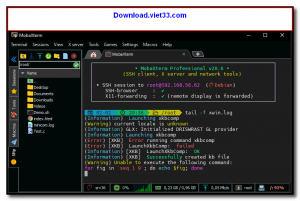
At its core, MobaXterm provides a tabbed terminal with a built-in Unix command-line environment on Windows so you can run bash, grep, awk, sed, and hundreds of other Unix commands without leaving the app. When you connect to a remote server via SSH, MobaXterm automatically opens an SFTP sidebar so you can browse and transfer files alongside your terminal session.
The free Home edition is generous enough for most users, while the Professional edition adds features like session management for large infrastructures and enhanced security options. MobaXterm is trusted by millions of IT professionals worldwide.
Key Features
- All-in-one remote client supporting SSH, RDP, VNC, FTP, SFTP, Telnet, Mosh, and X11
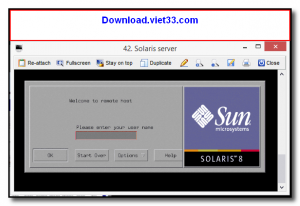
- Built-in X11 server to run graphical Linux applications over SSH with no extra setup
- Automatic SFTP file browser opens alongside every SSH session for easy file transfer
- Tabbed interface to manage multiple remote sessions simultaneously
- Built-in Unix toolkit (bash, ls, grep, awk, sed, rsync, wget) on Windows
- Macro recording and session scripting for automating repetitive tasks
- Portable version available — runs from a USB drive with no installation
How to Install
- Click the download button below to get the MobaXterm Home Edition installer or portable version.
- For the installer, run the .msi file and follow the setup wizard to complete installation.
- For the portable version, extract the ZIP and run MobaXterm.exe directly from any folder.
- Launch MobaXterm and click Session to configure a new SSH, RDP, or VNC connection.
- Enter your server address, username, and authentication method, then click OK to connect.
Frequently Asked Questions about MobaXterm – All-in-One Remote Desktop and SSH Client for Windows
Is MobaXterm – All-in-One Remote Desktop and SSH Client for Windows free?
MobaXterm – All-in-One Remote Desktop and SSH Client for Windows is completely free to download and use — no registration or payment required.
What are the system requirements for MobaXterm – All-in-One Remote Desktop and SSH Client for Windows?
Minimum requirements: Windows7,8,10,11. A modern PC with at least 2GB RAM is recommended.
What is the latest version of MobaXterm – All-in-One Remote Desktop and SSH Client for Windows?
The latest version is 25.2, updated on 31/10/2025.
Is MobaXterm – All-in-One Remote Desktop and SSH Client for Windows safe to download?
Yes. All software listed on download.viet33.com is sourced directly from the official developer and verified before publishing. No bundled adware or malware.
Does MobaXterm – All-in-One Remote Desktop and SSH Client for Windows work on Windows 11?
Yes, MobaXterm – All-in-One Remote Desktop and SSH Client for Windows is compatible with Windows7,8,10,11, including Windows 11.
 Download DesktopCalendar 2.3.108.5601
87 Downloads
Download DesktopCalendar 2.3.108.5601
87 Downloads
 Download Hard Disk Sentinel 6.40
73 Downloads
Download Hard Disk Sentinel 6.40
73 Downloads
 Download Windows 10
57 Downloads
Download Windows 10
57 Downloads
 Download Sound Booster 1.2
57 Downloads
Download Sound Booster 1.2
57 Downloads
 Download 3DP Chip 26.06
70 Downloads
Download 3DP Chip 26.06
70 Downloads


