
Mise (formerly rtx) is a free, open-source polyglot development environment manager that lets you install and switch between multiple versions of programming languages and tools on a per-project basis. It is a fast, Rust-based alternative to tools like asdf, nvm, pyenv, and rbenv, consolidating all version management into a single tool.
By placing a .tool-versions or .mise.toml file in your project directory, Mise automatically activates the correct versions of Node.js, Python, Ruby, Go, Java, and hundreds of other tools the moment you enter that directory. This eliminates “works on my machine” problems caused by version mismatches across team members.
Mise also manages environment variables and tasks, making it a lightweight alternative to Makefiles and shell scripts for project automation. It is fully compatible with the asdf plugin ecosystem, giving it access to thousands of installable tools.
Key Features
- Manages versions of Node.js, Python, Ruby, Go, Java, and hundreds more
- Per-directory automatic version switching via
.tool-versionsor.mise.toml - Compatible with the full asdf plugin ecosystem
- Environment variable management per project
- Built-in task runner as a lightweight Makefile replacement
- Written in Rust for fast startup and low overhead
- Cross-platform: Linux, macOS, and Windows (WSL)
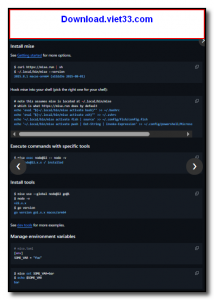
How to Install
- Click the download button or install via the official script:
curl https://mise.run | sh - Add Mise to your shell by following the activation instructions for bash, zsh, or fish printed after installation.
- Restart your shell or run
source ~/.bashrc(or equivalent) to activate Mise. - In your project directory, run
mise use node@20to install and pin Node.js 20, or edit.mise.tomlmanually. - Run
mise installto install all tools defined in your project config file.
Frequently Asked Questions about Mise
Is Mise free?
Mise is completely free to download and use — no registration or payment required.
What are the system requirements for Mise?
Minimum requirements: Windows7,8,10,11. A modern PC with at least 2GB RAM is recommended.
What is the latest version of Mise?
Check the version info box at the top of this page for the current release.
Is Mise safe to download?
Yes. All software listed on download.viet33.com is sourced directly from the official developer and verified before publishing. No bundled adware or malware.
Does Mise work on Windows 11?
Yes, Mise is compatible with Windows7,8,10,11, including Windows 11.
 Download Office Deployment Tool
58 Downloads
Download Office Deployment Tool
58 Downloads
 Download AutoIt
19755 Downloads
Download AutoIt
19755 Downloads
 Download Construct 2
19673 Downloads
Download Construct 2
19673 Downloads
 Download AEdiX Suite
20328 Downloads
Download AEdiX Suite
20328 Downloads
 Download UltraEdit
20055 Downloads
Download UltraEdit
20055 Downloads


