
LogMeIn Hamachi is a hosted VPN service that lets you create secure virtual private networks on demand, connecting multiple computers as if they were on the same local area network. It is widely used by gamers, small businesses, and remote workers who need simple and reliable LAN networking over the internet.
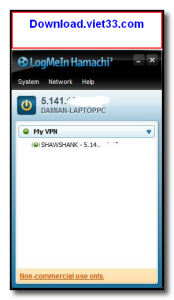
Hamachi makes it easy to set up a virtual LAN without any router configuration, port forwarding, or advanced networking knowledge. Simply install Hamachi on each computer, create or join a network, and all connected devices can communicate securely as though they are physically on the same network.
The free plan supports up to 5 devices per network and is ideal for small teams, LAN gaming parties, and personal use. Premium plans offer larger networks and centralized management features for business deployments.
Key Features
- Create secure virtual LAN networks accessible over the internet
- No router configuration or port forwarding required
- AES 256-bit encryption for all network traffic
- Free plan supports up to 5 devices per network
- Gateway and mesh VPN modes for flexible network topologies
- Centralized network management via the LogMeIn web console
- Widely used for LAN gaming, remote file sharing, and team collaboration
How to Install
- Click the download button above to get the Hamachi installer.
- Run the setup file and follow the on-screen instructions to install.
- Launch Hamachi and create a free account or log in.
- Click “Create a new network” to set up your virtual LAN.
- Share your network ID and password with others — they join via “Join a network”.
Frequently Asked Questions about LogMeIn Hamachi
Is LogMeIn Hamachi free?
LogMeIn Hamachi offers a free trial period. Full features may require a paid license.
What are the system requirements for LogMeIn Hamachi?
Minimum requirements: Windows7,8,10,11. A modern PC with at least 2GB RAM is recommended.
What is the latest version of LogMeIn Hamachi?
The latest version is 2.3.0, updated on 24/12/2025.
Is LogMeIn Hamachi safe to download?
Yes. All software listed on download.viet33.com is sourced directly from the official developer and verified before publishing. No bundled adware or malware.
Does LogMeIn Hamachi work on Windows 11?
Yes, LogMeIn Hamachi is compatible with Windows7,8,10,11, including Windows 11.
 Download DesktopCalendar 2.3.108.5601
87 Downloads
Download DesktopCalendar 2.3.108.5601
87 Downloads
 Download Hard Disk Sentinel 6.40
73 Downloads
Download Hard Disk Sentinel 6.40
73 Downloads
 Download Windows 10
57 Downloads
Download Windows 10
57 Downloads
 Download Sound Booster 1.2
57 Downloads
Download Sound Booster 1.2
57 Downloads
 Download 3DP Chip 26.06
71 Downloads
Download 3DP Chip 26.06
71 Downloads


