
LCD Image Converter is a free, open-source tool for embedded systems developers that converts bitmap images and fonts into C source code arrays ready to be compiled into microcontroller firmware. It is designed for programmers working with monochrome or color LCD displays on Arduino, STM32, AVR, PIC, and other embedded platforms.
The tool allows you to import standard image files (BMP, PNG, JPG) and configure how they are converted — including bit depth, color format, pixel ordering, data orientation, and compression. The output is a ready-to-use C header file containing the image data as a byte or word array that you can include directly in your embedded project.
LCD Image Converter also supports font generation, allowing you to select system fonts or custom TTF fonts and convert character sets into the compact bitmap format required by embedded display drivers. It is widely used in the maker and embedded engineering communities for creating custom graphics and text for small displays.
Key Features
- Converts BMP, PNG, and JPG images to C arrays for use in embedded firmware.
- Configurable output: bit depth, color format (RGB565, monochrome, etc.), and byte ordering.
- Font generation from system or custom TTF fonts with character range selection.
- Preview panel showing how the image will appear on the target LCD display.
- Supports horizontal and vertical data scanning modes for different display controllers.
- Outputs C source and header files ready for direct inclusion in embedded projects.
- Open source under the GNU GPL license — free for personal and commercial use.
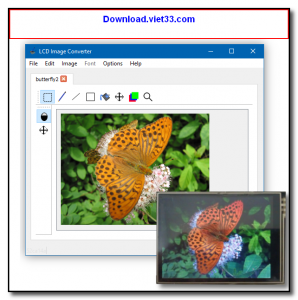
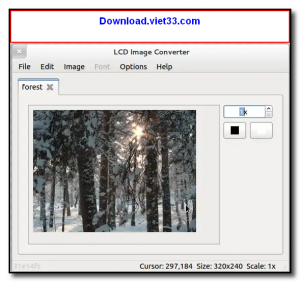
How to Install
- Download the LCD Image Converter installer or ZIP archive from the link below.
- Run the installer or extract the portable ZIP to your preferred location.
- Launch lcd-image-converter.exe (Windows) or the equivalent binary on Linux/macOS.
- Go to File → Open to load an image, then configure conversion settings in the Options panel.
- Click File → Convert to generate the C source file and copy it into your embedded project.
Frequently Asked Questions about LCD Image Converter – Image to C Array Tool for Embedded LCD Displays
Is LCD Image Converter – Image to C Array Tool for Embedded LCD Displays free?
LCD Image Converter – Image to C Array Tool for Embedded LCD Displays is completely free to download and use — no registration or payment required.
What are the system requirements for LCD Image Converter – Image to C Array Tool for Embedded LCD Displays?
Minimum requirements: Windows7,8,10,11. A modern PC with at least 2GB RAM is recommended.
What is the latest version of LCD Image Converter – Image to C Array Tool for Embedded LCD Displays?
Check the version info box at the top of this page for the current release.
Is LCD Image Converter – Image to C Array Tool for Embedded LCD Displays safe to download?
Yes. All software listed on download.viet33.com is sourced directly from the official developer and verified before publishing. No bundled adware or malware.
Does LCD Image Converter – Image to C Array Tool for Embedded LCD Displays work on Windows 11?
Yes, LCD Image Converter – Image to C Array Tool for Embedded LCD Displays is compatible with Windows7,8,10,11, including Windows 11.
 Download Office Deployment Tool
58 Downloads
Download Office Deployment Tool
58 Downloads
 Download AutoIt
19755 Downloads
Download AutoIt
19755 Downloads
 Download Construct 2
19673 Downloads
Download Construct 2
19673 Downloads
 Download AEdiX Suite
20328 Downloads
Download AEdiX Suite
20328 Downloads
 Download UltraEdit
20055 Downloads
Download UltraEdit
20055 Downloads


