
JUnit 5 is the next generation of the JUnit testing framework for Java, redesigned from the ground up to provide a modern, extensible, and expressive API for writing and running unit tests. It is the de facto standard for unit testing in the Java ecosystem, supported natively by all major Java IDEs including IntelliJ IDEA, Eclipse, and NetBeans, as well as build tools like Maven and Gradle.
JUnit 5 is composed of three sub-projects: JUnit Platform (the foundation for launching testing frameworks on the JVM), JUnit Jupiter (the new programming and extension model for writing tests), and JUnit Vintage (backward compatibility for running JUnit 3 and JUnit 4 tests). This modular architecture makes JUnit 5 highly adaptable and extensible for diverse testing needs.
Jupiter introduces powerful new features including parameterized tests, dynamic tests, nested test classes, conditional test execution, custom annotations, and a rich extension API. These capabilities allow developers to write cleaner, more expressive, and more maintainable test suites for both simple unit tests and complex integration test scenarios.
Key Features
- Modern annotation-based test API with @Test, @BeforeEach, @AfterEach, @BeforeAll, @AfterAll, and more.
- Parameterized tests with @ParameterizedTest for data-driven testing with multiple input sets.
- Dynamic tests with @TestFactory for runtime test generation.
- Nested test classes with @Nested for hierarchical test organization.
- Conditional test execution with @EnabledOnOs, @EnabledIfSystemProperty, and custom conditions.
- Powerful extension API for custom test lifecycle hooks, parameter resolvers, and reporting.
- Full backward compatibility with JUnit 4 tests via the JUnit Vintage engine.
How to Install
- Add JUnit 5 to your Maven project by adding the junit-jupiter dependency to your pom.xml.
- For Gradle, add testImplementation(“org.junit.jupiter:junit-jupiter:5.x.x”) to your build.gradle.
- Ensure your build tool is configured to use the JUnit Platform: Maven Surefire 2.22+ or Gradle 4.6+.
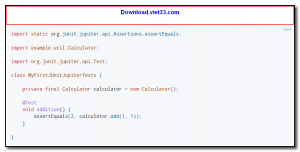
- Write your first test: create a class with a method annotated with @Test and use Assertions.assertEquals() to verify results.
- Run tests via your IDE test runner or the command line with mvn test or gradle test.
Frequently Asked Questions about JUnit 5 – Modern Java Unit Testing Framework
Is JUnit 5 – Modern Java Unit Testing Framework free?
JUnit 5 – Modern Java Unit Testing Framework is completely free to download and use — no registration or payment required.
What are the system requirements for JUnit 5 – Modern Java Unit Testing Framework?
Minimum requirements: Windows 7/10/11. A modern PC with at least 2GB RAM is recommended.
What is the latest version of JUnit 5 – Modern Java Unit Testing Framework?
The latest version is 5.13.4, updated on 22/09/2025.
Is JUnit 5 – Modern Java Unit Testing Framework safe to download?
Yes. All software listed on download.viet33.com is sourced directly from the official developer and verified before publishing. No bundled adware or malware.
Does JUnit 5 – Modern Java Unit Testing Framework work on Windows 11?
Yes, JUnit 5 – Modern Java Unit Testing Framework is compatible with Windows 7/10/11, including Windows 11.
 Download Office Deployment Tool
58 Downloads
Download Office Deployment Tool
58 Downloads
 Download AutoIt
19755 Downloads
Download AutoIt
19755 Downloads
 Download Construct 2
19673 Downloads
Download Construct 2
19673 Downloads
 Download AEdiX Suite
20328 Downloads
Download AEdiX Suite
20328 Downloads
 Download UltraEdit
20055 Downloads
Download UltraEdit
20055 Downloads


