
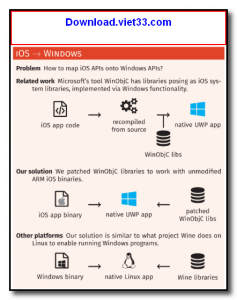
iPaSim is an open-source iOS simulator for Windows that allows developers to run and test iOS applications on a Windows PC without needing a Mac or physical Apple device. Built using the QEMU emulator and Wine compatibility layer, iPaSim translates iOS system calls into Windows-compatible equivalents, enabling basic iOS app execution in a simulated environment.
The project is primarily aimed at iOS developers on Windows who want to perform initial testing and debugging of their apps without switching to macOS. It provides a simulated iPhone environment where apps compiled for iOS can be loaded and run, making it a useful tool for cross-platform development workflows.
Note that iPaSim is an experimental project and does not support all iOS APIs or hardware features. It is best suited for testing logic-heavy applications and basic UI interactions rather than apps that rely heavily on iOS-specific hardware like cameras, GPS, or Bluetooth.
Key Features
- Run compiled iOS applications on Windows without a Mac or physical Apple device.
- Built on QEMU emulation and Wine for iOS-to-Windows system call translation.
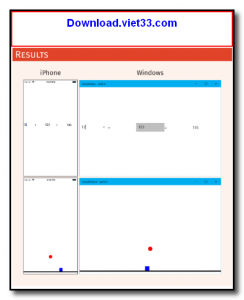
- Simulates an iPhone environment for basic app logic testing and UI previewing.
- Supports apps compiled with standard iOS SDKs for ARM and x86 targets.
- Open source project — free to use, study, and contribute to on GitHub.
- Useful for cross-platform developers who need quick iOS environment access on Windows.
- Lightweight setup compared to running a full macOS virtual machine.
How to Install
- Download the iPaSim release package from the link below.
- Extract the ZIP archive to a folder of your choice.
- Run the iPaSim.exe launcher as Administrator.
- Load your compiled iOS app binary (IPA file) via the File → Open menu.
- Click Start to launch the simulated iPhone environment and test your application.
Frequently Asked Questions about iPaSim – Open Source iOS Simulator for Windows
Is iPaSim – Open Source iOS Simulator for Windows free?
iPaSim – Open Source iOS Simulator for Windows is completely free to download and use — no registration or payment required.
What are the system requirements for iPaSim – Open Source iOS Simulator for Windows?
Minimum requirements: Windows7,8,10,11. A modern PC with at least 2GB RAM is recommended.
What is the latest version of iPaSim – Open Source iOS Simulator for Windows?
The latest version is 1.0.1, updated on 03/10/2025.
Is iPaSim – Open Source iOS Simulator for Windows safe to download?
Yes. All software listed on download.viet33.com is sourced directly from the official developer and verified before publishing. No bundled adware or malware.
Does iPaSim – Open Source iOS Simulator for Windows work on Windows 11?
Yes, iPaSim – Open Source iOS Simulator for Windows is compatible with Windows7,8,10,11, including Windows 11.
 Download DesktopCalendar 2.3.108.5601
87 Downloads
Download DesktopCalendar 2.3.108.5601
87 Downloads
 Download Hard Disk Sentinel 6.40
73 Downloads
Download Hard Disk Sentinel 6.40
73 Downloads
 Download Windows 10
57 Downloads
Download Windows 10
57 Downloads
 Download Sound Booster 1.2
57 Downloads
Download Sound Booster 1.2
57 Downloads
 Download 3DP Chip 26.06
70 Downloads
Download 3DP Chip 26.06
70 Downloads


