
HandBrake is a free, open-source video transcoder available for Windows, macOS, and Linux. It supports a wide range of input formats and can convert video files to popular modern formats such as MP4, MKV, and WebM, making it one of the most versatile video conversion tools available.
Originally developed to rip DVDs, HandBrake has evolved into a full-featured video converter with hardware-accelerated encoding, subtitle support, and batch processing. It is widely used by both home users and professionals for compressing large video files without noticeable quality loss.
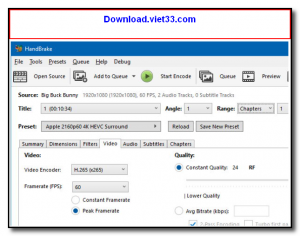
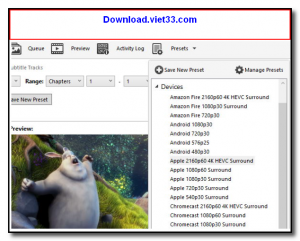
HandBrake’s presets system makes it easy to encode videos optimized for specific devices or platforms, from smartphones to streaming services. Advanced users can fine-tune bitrate, resolution, frame rate, and audio settings with granular control.
Key Features
- Converts video from virtually any format to MP4, MKV, or WebM
- Hardware-accelerated encoding via Intel QSV, NVIDIA NVENC, and AMD VCE
- Built-in presets optimized for phones, tablets, TVs, and streaming
- Supports subtitle tracks and chapter markers
- Batch queue for processing multiple files unattended
- Open-source and completely free with no watermarks or restrictions
- Available on Windows, macOS, and Linux
How to Install
- Click the download button to get the HandBrake installer for your operating system.
- Run the installer and follow the on-screen setup steps.
- Launch HandBrake and click Open Source to select your input video file.
- Choose a preset from the right panel or customize your output settings manually.
- Click Start Encode to begin the conversion and wait for it to complete.
Frequently Asked Questions about HandBrake
Is HandBrake free?
HandBrake is completely free to download and use — no registration or payment required.
What are the system requirements for HandBrake?
Minimum requirements: Windows7,8,10,11. A modern PC with at least 2GB RAM is recommended.
What is the latest version of HandBrake?
The latest version is 1.10.2, updated on 02/12/2025.
Is HandBrake safe to download?
Yes. All software listed on download.viet33.com is sourced directly from the official developer and verified before publishing. No bundled adware or malware.
Does HandBrake work on Windows 11?
Yes, HandBrake is compatible with Windows7,8,10,11, including Windows 11.
 Download DesktopCalendar 2.3.108.5601
87 Downloads
Download DesktopCalendar 2.3.108.5601
87 Downloads
 Download Hard Disk Sentinel 6.40
73 Downloads
Download Hard Disk Sentinel 6.40
73 Downloads
 Download Windows 10
57 Downloads
Download Windows 10
57 Downloads
 Download Sound Booster 1.2
57 Downloads
Download Sound Booster 1.2
57 Downloads
 Download 3DP Chip 26.06
70 Downloads
Download 3DP Chip 26.06
70 Downloads


