
FreeMat is a free, open-source numerical computing environment and programming language similar to MATLAB and GNU Octave. It is designed for scientific computing, data analysis, signal processing, and mathematical simulation — providing matrix operations, plotting, and a rich set of built-in functions in a familiar syntax.
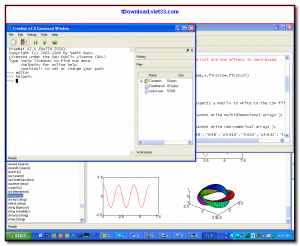
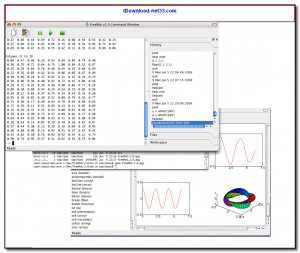
FreeMat supports most of the core MATLAB language features including matrix and vector operations, control flow (for, while, if), function definitions, and cell arrays. Its built-in 2D and 3D plotting capabilities let you visualize data without requiring additional libraries, and the interactive command window makes it easy to explore computations step by step.
FreeMat is an excellent free alternative for students, engineers, and researchers who need a MATLAB-like environment for numerical computation without the cost of a commercial license.
Key Features
- Matrix and vector operations with MATLAB-compatible syntax for easy transition
- Built-in 2D and 3D plotting functions for data visualization and graph generation
- Interactive command-line interface and integrated script editor
- Support for complex numbers, sparse matrices, and linear algebra operations
- User-defined functions and scripts with support for cell arrays and structures
- Signal processing and statistical functions built in
- Cross-platform — available for Windows, Linux, and macOS
How to Install
- Click the download button below to get the FreeMat installer for your operating system.
- On Windows, run the .exe installer and follow the setup wizard to complete installation.
- On Linux, download the binary package or install from your distribution repository.
- Launch FreeMat — the interactive command window opens, ready for immediate use.
- Type commands directly in the console or open the script editor to write and run longer programs.
Frequently Asked Questions about FreeMat – Free MATLAB-Compatible Numerical Computing Environment
Is FreeMat – Free MATLAB-Compatible Numerical Computing Environment free?
FreeMat – Free MATLAB-Compatible Numerical Computing Environment is completely free to download and use — no registration or payment required.
What are the system requirements for FreeMat – Free MATLAB-Compatible Numerical Computing Environment?
Minimum requirements: Windows7,8,10,11. A modern PC with at least 2GB RAM is recommended.
What is the latest version of FreeMat – Free MATLAB-Compatible Numerical Computing Environment?
The latest version is 4.2, updated on 22/10/2025.
Is FreeMat – Free MATLAB-Compatible Numerical Computing Environment safe to download?
Yes. All software listed on download.viet33.com is sourced directly from the official developer and verified before publishing. No bundled adware or malware.
Does FreeMat – Free MATLAB-Compatible Numerical Computing Environment work on Windows 11?
Yes, FreeMat – Free MATLAB-Compatible Numerical Computing Environment is compatible with Windows7,8,10,11, including Windows 11.
 Download DesktopCalendar 2.3.108.5601
87 Downloads
Download DesktopCalendar 2.3.108.5601
87 Downloads
 Download Hard Disk Sentinel 6.40
73 Downloads
Download Hard Disk Sentinel 6.40
73 Downloads
 Download Windows 10
57 Downloads
Download Windows 10
57 Downloads
 Download Sound Booster 1.2
57 Downloads
Download Sound Booster 1.2
57 Downloads
 Download 3DP Chip 26.06
70 Downloads
Download 3DP Chip 26.06
70 Downloads


