
Freegate is a free anti-censorship software that allows users to bypass internet firewalls and access blocked websites quickly and securely. Developed by Dynamic Internet Technology, it uses a network of proxy servers to tunnel your web traffic and circumvent government or corporate internet restrictions.
Freegate is especially popular in regions with heavy internet censorship, providing fast and reliable access to social media, news sites, and other blocked content. It requires no installation — simply run the executable and start browsing freely.
With its lightweight design and automatic proxy selection, Freegate is one of the simplest and most effective tools available for bypassing online censorship and protecting your internet freedom.
Key Features
- Bypasses internet censorship and firewalls with a single click
- Uses an encrypted peer-to-peer proxy network for secure browsing
- Portable — no installation required, runs directly from the executable
- Automatically selects the fastest available proxy server
- Supports standard HTTP and HTTPS web browsing
- Lightweight with minimal system resource usage
- Regularly updated proxy server list to maintain access
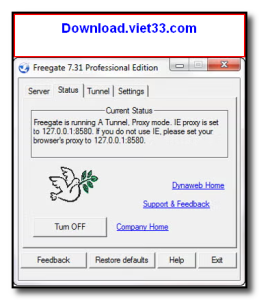
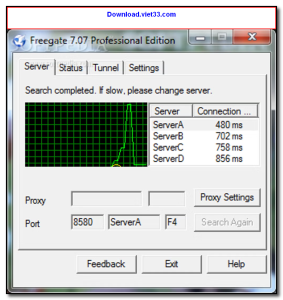
How to Install
- Click the download button above to get the Freegate executable file.
- No installation needed — save the file to any folder on your computer.
- Double-click the Freegate executable to launch it.
- Wait for Freegate to connect to a proxy server (status will turn green).
- Open your browser — you can now access blocked websites freely.
 Download Revo Uninstaller Portable 2.7.0
18 Downloads
Download Revo Uninstaller Portable 2.7.0
18 Downloads
 Download FurMark 2.10.2
19 Downloads
Download FurMark 2.10.2
19 Downloads
 Download VMware Workstation Pro 26H1
17 Downloads
Download VMware Workstation Pro 26H1
17 Downloads
 Download CrystalDiskInfo 9.9.2
20 Downloads
Download CrystalDiskInfo 9.9.2
20 Downloads
 Download DirectX 12
15 Downloads
Download DirectX 12
15 Downloads

