
FastQC is a widely-used quality control tool for high-throughput sequencing data. Developed by the Babraham Institute, it provides a comprehensive set of analyses to rapidly assess the quality of raw sequencing reads from platforms such as Illumina, Oxford Nanopore, PacBio, and others. FastQC produces detailed HTML reports that highlight potential issues in sequencing data before downstream analysis.
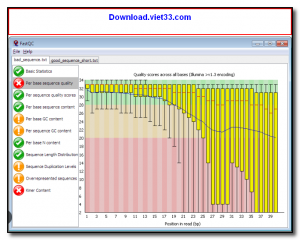
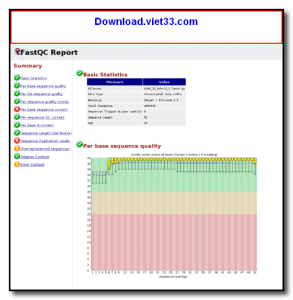
Each FastQC report includes multiple quality metrics including per-base sequence quality scores, GC content distribution, sequence duplication levels, adapter contamination detection, and overrepresented sequence analysis. These metrics help bioinformaticians identify whether data requires trimming, filtering, or additional preprocessing before alignment or assembly.
FastQC runs as a standalone Java application with both a graphical interface for interactive analysis and a command-line mode suitable for batch processing and integration into bioinformatics pipelines. It is one of the first tools run in virtually every next-generation sequencing (NGS) workflow.
Key Features
- Per-base and per-sequence quality score analysis with interactive graphs.
- GC content distribution check to detect contamination or library bias.
- Sequence duplication level analysis to identify PCR artifacts.
- Adapter content detection for common Illumina and other sequencing adapters.
- Overrepresented sequence identification for contamination screening.
- Batch processing via command-line for integration into NGS pipelines.
- Generates self-contained HTML reports and ZIP archives for easy sharing.
How to Install
- Ensure Java Runtime Environment (JRE) 11 or later is installed on your system.
- Download the FastQC ZIP archive from the link below.
- Extract the archive to your preferred location.
- On Linux/macOS, make the fastqc script executable: chmod +x fastqc
- Run fastqc to open the GUI, or use fastqc input.fastq from the command line for batch analysis.
Frequently Asked Questions about FastQC – Quality Control Tool for High-Throughput Sequencing Data
Is FastQC – Quality Control Tool for High-Throughput Sequencing Data free?
FastQC – Quality Control Tool for High-Throughput Sequencing Data is completely free to download and use — no registration or payment required.
What are the system requirements for FastQC – Quality Control Tool for High-Throughput Sequencing Data?
Minimum requirements: Windows 7/10/11. A modern PC with at least 2GB RAM is recommended.
What is the latest version of FastQC – Quality Control Tool for High-Throughput Sequencing Data?
The latest version is 0.12.1, updated on 05/10/2025.
Is FastQC – Quality Control Tool for High-Throughput Sequencing Data safe to download?
Yes. All software listed on download.viet33.com is sourced directly from the official developer and verified before publishing. No bundled adware or malware.
Does FastQC – Quality Control Tool for High-Throughput Sequencing Data work on Windows 11?
Yes, FastQC – Quality Control Tool for High-Throughput Sequencing Data is compatible with Windows 7/10/11, including Windows 11.
 Download DesktopCalendar 2.3.108.5601
87 Downloads
Download DesktopCalendar 2.3.108.5601
87 Downloads
 Download Hard Disk Sentinel 6.40
73 Downloads
Download Hard Disk Sentinel 6.40
73 Downloads
 Download Windows 10
57 Downloads
Download Windows 10
57 Downloads
 Download Sound Booster 1.2
57 Downloads
Download Sound Booster 1.2
57 Downloads
 Download 3DP Chip 26.06
70 Downloads
Download 3DP Chip 26.06
70 Downloads


