
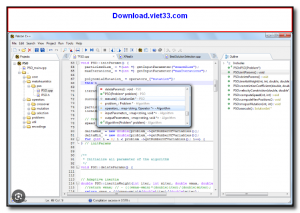
Falcon C++ is a free, lightweight integrated development environment (IDE) for C and C++ programming on Windows. Designed to be simple and fast, it provides a clean coding environment with syntax highlighting, code completion, a built-in compiler (GCC via MinGW), and an integrated debugger — making it an excellent choice for students and beginners learning C/C++ programming.
Unlike heavier IDEs like Visual Studio or Code::Blocks, Falcon C++ has a minimal footprint and starts up quickly, while still offering the essential features needed for C and C++ development. It includes a project manager for organizing source files, a build system, and error highlighting that helps beginners identify and fix compilation errors quickly.
Falcon C++ is particularly popular in educational settings and among users who want a straightforward, no-frills C++ development environment without the complexity of commercial or enterprise-grade IDEs. It supports standard C89, C99, C11, C++03, C++11, and C++14 with the bundled GCC compiler.
Key Features
- Lightweight C/C++ IDE with syntax highlighting and code auto-completion.
- Integrated GCC compiler via MinGW for compiling standard C and C++ code on Windows.
- Built-in debugger for step-by-step code execution and variable inspection.
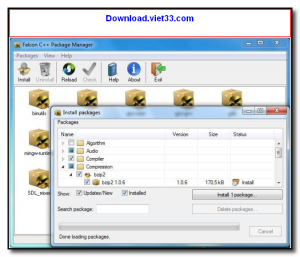
- Project manager for organizing source files, headers, and build configurations.
- Error highlighting and clickable error messages for quick navigation to issues.
- Fast startup time and minimal system resource usage.
- Free to use, ideal for students and beginners learning C and C++ programming.
How to Install
- Download the Falcon C++ installer from the link below.
- Run the installer and follow the setup wizard to install the IDE and bundled GCC compiler.
- Launch Falcon C++ from the Start Menu or desktop shortcut.
- Create a new project via File → New Project and add a C++ source file.
- Write your code, press F9 to compile and run, and use F7 to step through in the debugger.
Frequently Asked Questions about Falcon C++ – Lightweight Free C/C++ IDE for Windows
Is Falcon C++ – Lightweight Free C/C++ IDE for Windows free?
Falcon C++ – Lightweight Free C/C++ IDE for Windows is completely free to download and use — no registration or payment required.
What are the system requirements for Falcon C++ – Lightweight Free C/C++ IDE for Windows?
Minimum requirements: Windows7,8,10,11. A modern PC with at least 2GB RAM is recommended.
What is the latest version of Falcon C++ – Lightweight Free C/C++ IDE for Windows?
The latest version is 3.3.0, updated on 15/09/2025.
Is Falcon C++ – Lightweight Free C/C++ IDE for Windows safe to download?
Yes. All software listed on download.viet33.com is sourced directly from the official developer and verified before publishing. No bundled adware or malware.
Does Falcon C++ – Lightweight Free C/C++ IDE for Windows work on Windows 11?
Yes, Falcon C++ – Lightweight Free C/C++ IDE for Windows is compatible with Windows7,8,10,11, including Windows 11.
 Download Office Deployment Tool
58 Downloads
Download Office Deployment Tool
58 Downloads
 Download AutoIt
19755 Downloads
Download AutoIt
19755 Downloads
 Download Construct 2
19673 Downloads
Download Construct 2
19673 Downloads
 Download AEdiX Suite
20328 Downloads
Download AEdiX Suite
20328 Downloads
 Download UltraEdit
20055 Downloads
Download UltraEdit
20055 Downloads


