
Ditto is a free, open-source clipboard manager for Windows that extends the functionality of the standard clipboard by keeping a searchable history of everything you copy. Instead of losing previously copied text, images, and files when you copy something new, Ditto stores your entire clipboard history and lets you quickly retrieve any item at any time.
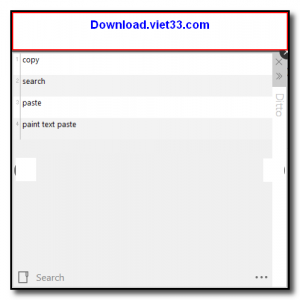
Ditto sits quietly in the system tray and is activated with a customizable keyboard shortcut, instantly displaying a searchable popup of your recent clipboard entries. You can search through hundreds of previous copies by typing keywords, and paste any item back into your current application with a single click or keyboard shortcut.
Beyond simple text, Ditto supports images, HTML content, and custom data formats. It also features network synchronization, allowing clipboard contents to be shared between multiple computers on the same network, and supports clipboard entry grouping, pinning, and encryption of sensitive entries for security.
Key Features
- Stores unlimited clipboard history including text, images, HTML, and file references.
- Instant searchable popup accessible via customizable keyboard shortcut.
- Network clipboard sync to share clipboard entries between multiple PCs on the same network.
- Pin frequently used entries to keep them permanently accessible.
- Clipboard entry grouping for organizing copied items by context.
- Optional encryption of clipboard data for privacy and security.
- Lightweight system tray app, free and open source under the GPL license.
How to Install
- Download the Ditto installer from the link below.
- Run the DittoSetup.exe installer and follow the on-screen steps.
- Ditto will start automatically and appear as an icon in the system tray.
- Press Ctrl+backtick (default shortcut) to open the clipboard history popup.
- Type to search your history, then click or press Enter on any entry to paste it into your active application.
Frequently Asked Questions about Ditto – Free Advanced Clipboard Manager for Windows
Is Ditto – Free Advanced Clipboard Manager for Windows free?
Ditto – Free Advanced Clipboard Manager for Windows is completely free to download and use — no registration or payment required.
What are the system requirements for Ditto – Free Advanced Clipboard Manager for Windows?
Minimum requirements: Windows7,8,10,11. A modern PC with at least 2GB RAM is recommended.
What is the latest version of Ditto – Free Advanced Clipboard Manager for Windows?
The latest version is 3.24.246, updated on 25/09/2025.
Is Ditto – Free Advanced Clipboard Manager for Windows safe to download?
Yes. All software listed on download.viet33.com is sourced directly from the official developer and verified before publishing. No bundled adware or malware.
Does Ditto – Free Advanced Clipboard Manager for Windows work on Windows 11?
Yes, Ditto – Free Advanced Clipboard Manager for Windows is compatible with Windows7,8,10,11, including Windows 11.
 Download DesktopCalendar 2.3.108.5601
87 Downloads
Download DesktopCalendar 2.3.108.5601
87 Downloads
 Download Hard Disk Sentinel 6.40
73 Downloads
Download Hard Disk Sentinel 6.40
73 Downloads
 Download Windows 10
57 Downloads
Download Windows 10
57 Downloads
 Download Sound Booster 1.2
57 Downloads
Download Sound Booster 1.2
57 Downloads
 Download 3DP Chip 26.06
71 Downloads
Download 3DP Chip 26.06
71 Downloads


