
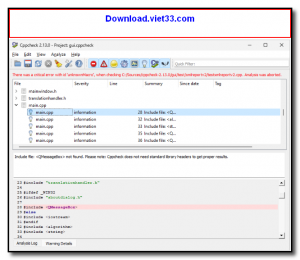
Cppcheck is a free and open-source static analysis tool specifically designed for C and C++ code. Unlike compilers that only check syntax, Cppcheck focuses on detecting actual bugs and undefined behavior in your source code — including null pointer dereferences, memory leaks, out-of-bounds array accesses, and more — without needing to compile the project.
The tool is widely used by professional developers and embedded systems engineers for its precision and low false-positive rate. Cppcheck integrates seamlessly with popular IDEs such as Visual Studio, Eclipse, and CLion, as well as CI/CD pipelines, making it an excellent addition to any C++ development workflow.
Whether you’re auditing legacy codebases or enforcing code quality standards on new projects, Cppcheck provides detailed, actionable reports that help you identify and fix issues before they reach production. It supports C89, C99, C11, C++03, C++11, C++14, C++17, and C++20 standards.
Key Features
- Detects bugs including null pointer dereferences, memory leaks, and buffer overflows.
- Checks for undefined behavior, uninitialized variables, and dead code.
- Supports all major C and C++ standards from C89 through C++20.
- Very low false-positive rate compared to other static analysis tools.
- Integrates with Visual Studio, Eclipse, CLion, Qt Creator, and CI/CD pipelines.
- Command-line interface with XML output for automation and reporting.
- Completely free and open source under the GNU GPL license.
How to Install
- Download the Cppcheck installer or ZIP archive from the link below.
- Run the installer and follow the on-screen setup wizard, or extract the ZIP to your preferred location.
- Add the Cppcheck installation directory to your system PATH for command-line use.
- Open a terminal and run cppcheck –version to confirm the installation.
- To analyze a project, run cppcheck /path/to/source and review the output for detected issues.
Frequently Asked Questions about Cppcheck – Free C/C++ Static Code Analysis Tool
Is Cppcheck – Free C/C++ Static Code Analysis Tool free?
Cppcheck – Free C/C++ Static Code Analysis Tool is completely free to download and use — no registration or payment required.
What are the system requirements for Cppcheck – Free C/C++ Static Code Analysis Tool?
Minimum requirements: Windows 7/10/11. A modern PC with at least 2GB RAM is recommended.
What is the latest version of Cppcheck – Free C/C++ Static Code Analysis Tool?
The latest version is 2.18.0, updated on 09/10/2025.
Is Cppcheck – Free C/C++ Static Code Analysis Tool safe to download?
Yes. All software listed on download.viet33.com is sourced directly from the official developer and verified before publishing. No bundled adware or malware.
Does Cppcheck – Free C/C++ Static Code Analysis Tool work on Windows 11?
Yes, Cppcheck – Free C/C++ Static Code Analysis Tool is compatible with Windows 7/10/11, including Windows 11.
 Download Office Deployment Tool
58 Downloads
Download Office Deployment Tool
58 Downloads
 Download AutoIt
19755 Downloads
Download AutoIt
19755 Downloads
 Download Construct 2
19673 Downloads
Download Construct 2
19673 Downloads
 Download AEdiX Suite
20328 Downloads
Download AEdiX Suite
20328 Downloads
 Download UltraEdit
20055 Downloads
Download UltraEdit
20055 Downloads


