
Download CaptureXT and capture screenshots with precision using one of the most intelligent screen capture tools for Windows. CaptureXT goes beyond basic screenshot utilities by offering smart capture modes, built-in annotation tools, and instant sharing options — making it perfect for documentation, tutorials, and professional presentations.
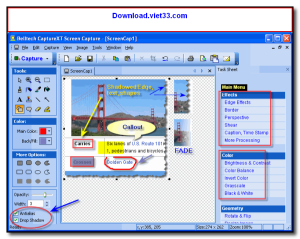
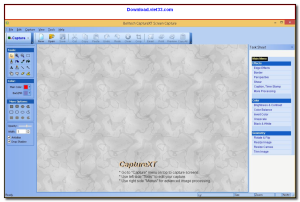
CaptureXT supports multiple capture modes including full screen, active window, custom region, and scrolling web page capture. After capturing, the built-in editor lets you annotate with arrows, text, shapes, and highlights before saving or sharing your screenshot.
Whether you’re creating software documentation, reporting bugs, or sharing screen content with colleagues, Download CaptureXT delivers the smart, efficient screenshot workflow you need on any Windows computer.
Key Features of CaptureXT
- Multiple capture modes: full screen, window, region, and scrolling capture
- Built-in editor with arrows, text boxes, shapes, and highlight tools
- Hotkey support for quick capture without interrupting your workflow
- Auto-save and instant copy to clipboard after each capture
- Timed capture mode for delayed or scheduled screenshots
- Output to PNG, JPG, BMP, GIF, and other popular image formats
- Lightweight and runs quietly in the system tray
How to Install CaptureXT
- Click the download button below to get the CaptureXT installer.
- Run the setup file and follow the on-screen installation wizard.
- Accept the license agreement and choose your installation directory.
- Launch CaptureXT from your desktop or Start menu.
- Enjoy using CaptureXT!
Frequently Asked Questions about CaptureXT
Is CaptureXT free?
CaptureXT offers a free trial period. Full features may require a paid license.
What are the system requirements for CaptureXT?
Minimum requirements: Windows7,8,10,11. A modern PC with at least 2GB RAM is recommended.
What is the latest version of CaptureXT?
The latest version is 4.0, updated on 15/01/2026.
Is CaptureXT safe to download?
Yes. All software listed on download.viet33.com is sourced directly from the official developer and verified before publishing. No bundled adware or malware.
Does CaptureXT work on Windows 11?
Yes, CaptureXT is compatible with Windows7,8,10,11, including Windows 11.
 Download DesktopCalendar 2.3.108.5601
87 Downloads
Download DesktopCalendar 2.3.108.5601
87 Downloads
 Download Hard Disk Sentinel 6.40
73 Downloads
Download Hard Disk Sentinel 6.40
73 Downloads
 Download Windows 10
57 Downloads
Download Windows 10
57 Downloads
 Download Sound Booster 1.2
57 Downloads
Download Sound Booster 1.2
57 Downloads
 Download 3DP Chip 26.06
70 Downloads
Download 3DP Chip 26.06
70 Downloads


