
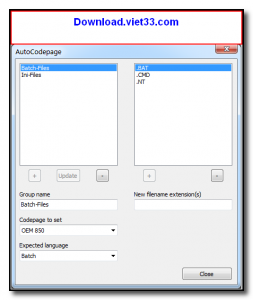
AutoCodepage is a lightweight utility for Windows that automatically detects and converts the character encoding of text files. It is especially useful for developers and content editors who work with files in multiple encodings such as UTF-8, ANSI, UTF-16, and various legacy code pages, helping eliminate garbled text and encoding mismatches across different systems.
The tool scans text files, identifies their current encoding, and converts them to the target encoding of your choice — all in batch mode. This makes AutoCodepage invaluable for projects that involve legacy data migration, internationalization work, or cross-platform file sharing where encoding consistency is critical.
AutoCodepage is portable and requires no installation. It integrates easily into batch scripts and automated workflows, making it a practical choice for developers, system administrators, and data processing teams who routinely handle text files in mixed encodings.
Key Features
- Automatic detection of text file encodings including UTF-8, UTF-16, ANSI, and Windows code pages.
- Batch conversion of multiple files from one encoding to another in a single operation.
- Supports a wide range of legacy code pages including CP1250, CP1252, ISO-8859, and more.
- BOM (Byte Order Mark) detection and optional removal or addition during conversion.
- Command-line interface for scripting and automation in batch workflows.
- Portable executable — no installation required, runs directly from any folder.
- Lightweight and fast — processes large numbers of files with minimal system overhead.
How to Install
- Download the AutoCodepage ZIP or executable from the link below.
- Extract the archive to a folder of your choice or place the EXE anywhere convenient.
- Run AutoCodepage.exe to open the graphical interface for file selection and encoding conversion.
- To use via command line, open a terminal in the same directory and run AutoCodepage.exe /help to see available options.
- Select your source files, choose the target encoding, and click Convert to process.
Frequently Asked Questions about AutoCodepage – Automatic Text File Encoding Detector and Converter
Is AutoCodepage – Automatic Text File Encoding Detector and Converter free?
AutoCodepage – Automatic Text File Encoding Detector and Converter is completely free to download and use — no registration or payment required.
What are the system requirements for AutoCodepage – Automatic Text File Encoding Detector and Converter?
Minimum requirements: Windows7,8,10,11. A modern PC with at least 2GB RAM is recommended.
What is the latest version of AutoCodepage – Automatic Text File Encoding Detector and Converter?
The latest version is 1.2.7.0, updated on 04/10/2025.
Is AutoCodepage – Automatic Text File Encoding Detector and Converter safe to download?
Yes. All software listed on download.viet33.com is sourced directly from the official developer and verified before publishing. No bundled adware or malware.
Does AutoCodepage – Automatic Text File Encoding Detector and Converter work on Windows 11?
Yes, AutoCodepage – Automatic Text File Encoding Detector and Converter is compatible with Windows7,8,10,11, including Windows 11.
 Download DesktopCalendar 2.3.108.5601
87 Downloads
Download DesktopCalendar 2.3.108.5601
87 Downloads
 Download Hard Disk Sentinel 6.40
73 Downloads
Download Hard Disk Sentinel 6.40
73 Downloads
 Download Windows 10
57 Downloads
Download Windows 10
57 Downloads
 Download Sound Booster 1.2
57 Downloads
Download Sound Booster 1.2
57 Downloads
 Download 3DP Chip 26.06
70 Downloads
Download 3DP Chip 26.06
70 Downloads


